Hitch Set-up and Use (Quick Reference)
Once implement is attached, follow these steps for tillage operations;
Adjustments
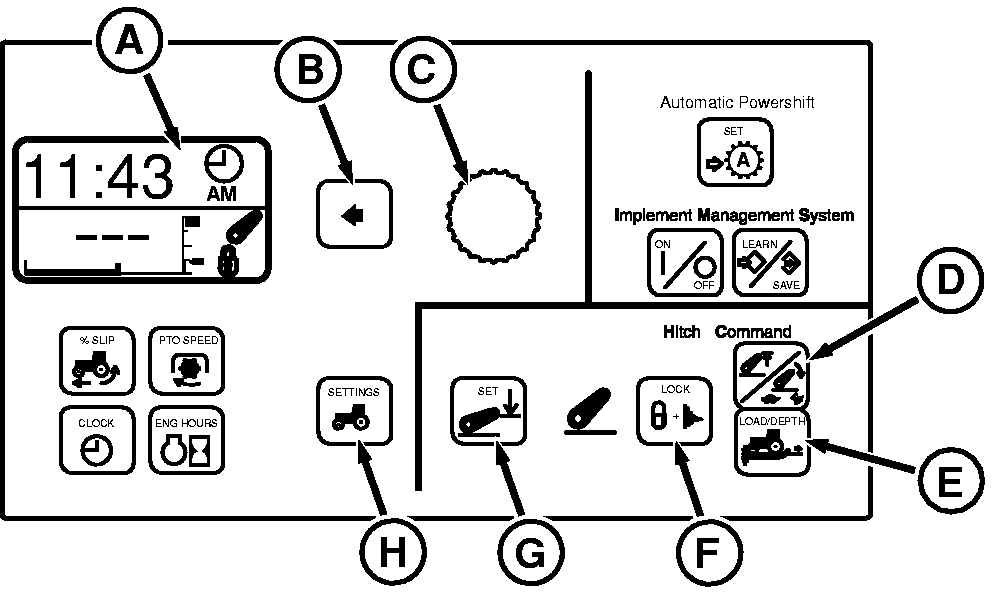
Select adjustment to display, change by turning Command Dial (C).
-
Select height limit by pressing Height/Rate switch (D)
once
-
Select drop rate by pressing Height/Rate switch (D)
twice
-
Select draft response by pressing LOAD/DEPTH switch (E)
Set Operating Depth
-
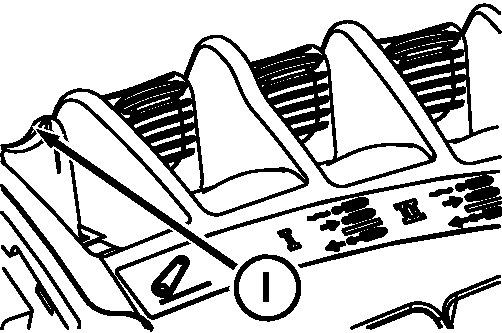
Lower implement to desired operating depth using Hitch Command lever (I)
-
Press SET switch to save operating depth (G)
Turn at End
-
At end of field, pull lever into raise detent and release. Hitch will raise to upper height limit.
-
After turnaround, push lever into lower detent and release. Hitch will lower to saved depth setting.
|
A-Display
B-Select Switch
C-Command Dial
D-Height/Rate Switch
E-LOAD/DEPTH Switch
F-LOCK Switch
G-Depth Set Switch
H-Vehicle Settings Switch
I-Hitch Command Lever
|