Removing and Installing Track
Track removal and installation is a procedure recommended for your John Deere dealer because of the difficulty and heavy-lifting equipment required. NOTE: Tracks are heavy: 16 in. wide track weighs approximately 272 kg (600 lb) and 25 in. wide track weighs approximately 409 kg (900 lb). If you have the necessary lifting equipment and understand the requirements needed for this procedure, continue as follows: 1. Park tractor on firm, level surface.
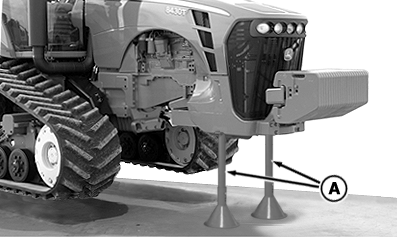
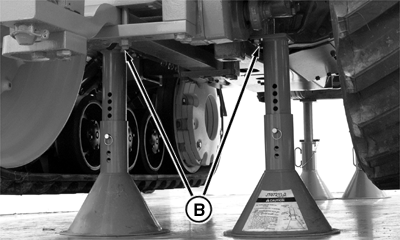
2. Raise entire tractor keeping tractor level front to back. Lift tractor until approximately 178 mm (8 in.) clearance exists between belt tread and ground. NOTE: Support stands are available from your John Deere dealer. 3. Attach support stands to front frame support (A) and rear drawbar support (B). |
|
 CAUTION:
Removing and installing tracks requires lifting heavy components which can cause severe injury or machine damage. Proper lifting equipment is required.
CAUTION:
Removing and installing tracks requires lifting heavy components which can cause severe injury or machine damage. Proper lifting equipment is required.
OURX935,0000074 -19-24AUG05-1/6 |
|
4.
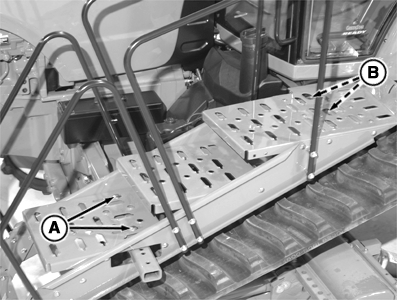
Remove cap screws (A) and (B) and remove step assembly.
|
|
OURX935,0000074 -19-24AUG05-2/6 |
|
5.
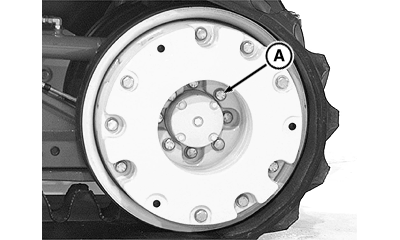
Loosen cap screws on outer idler wheel (A), but do NOT remove.
6. Remove track tension. See Track Tensioning and Detensioning in this section. NOTE: The track should be dragging on the ground. 7. Remove the outer front idler wheel. 8. Remove the track. NOTE: Adjust tread at this point if necessary. The procedure for tread adjustment is easier without the tracks installed. See Adjust Track Settings in this section. |
|
OURX935,0000074 -19-24AUG05-3/6 |
|
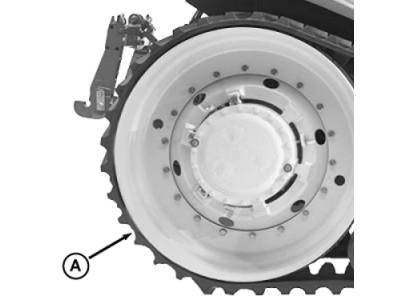
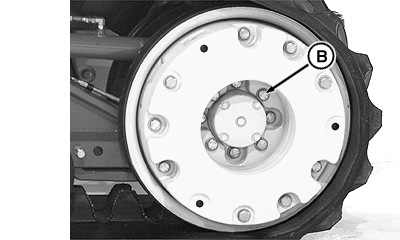
9.
Install the track onto drive wheel (A).
10. Slide front of track over inner idler wheel. NOTE: Use of soapy water on the idler wheel greatly aids in getting the track over the wheel. 11. Install the outer idler wheel (B) and hand tighten cap screws.
|
|
OURX935,0000074 -19-24AUG05-4/6 |
|
12.
Replace step assembly. Tighten cap screws (A) and (B) to 100 N·m (73 lb-ft) minimum.
13. Move steps to align with center of track. See Positioning Steps in Operator Station section. 14. Tighten the track. See Track Tensioning and Detensioning in this section.
|
|
OURX935,0000074 -19-24AUG05-5/6 |
|
15.
Tighten cap screws (A) to 610 N·m (450 lb-ft).
16. Remove support stands and lower tractor to the ground. 17. Align the track. See Aligning the Track in this section. 18. Retighten the idler wheel cap screws to 610 N·m (450 lb-ft). 19. Tighten the track a second time to insure full track tension, and remove track tension hose.
|
|
OURX935,0000074 -19-24AUG05-6/6 |