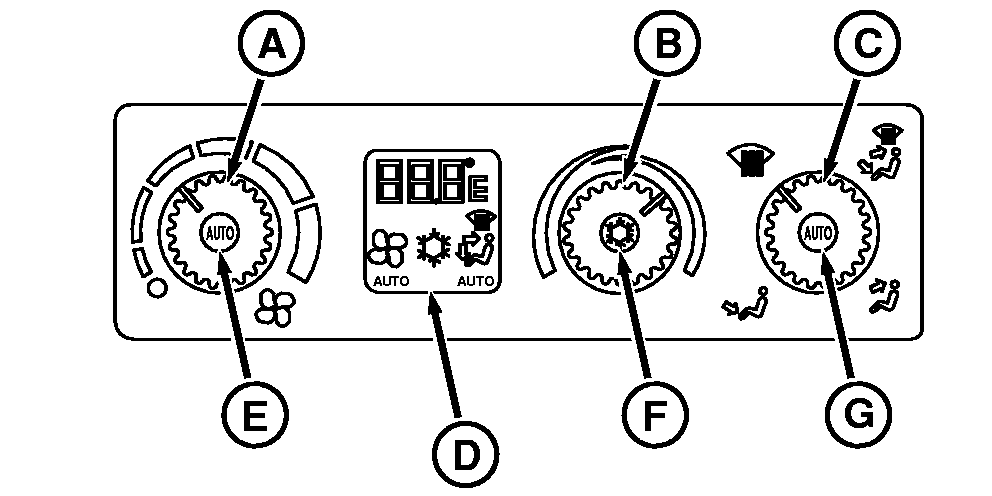
Using ClimaTrak (ATC) (If Equipped)System Control and Display Panel There are three controls and an ATC display window on the right side console for ClimaTrak (ATC) system: 1.
Blower Speed Control (A) with AUTO blower control button (E)
Ambient air temperature is displayed on the ATC display (D). Upon adjustment of the temperature control knob and at tractor start up, the temperature set point (desired temperature) is displayed for 10 seconds. Ambient air temperature (obtained from sensor outside of cab at air inlet) is adjusted using a correction factor to minimize the effect of vehicle heat. When the system is in automatic blower mode, a fan symbol and the word "AUTO" is displayed. When the A/C clutch is engaged the snowflake symbol is displayed. Air flow mode is indicated by an arrow pointing toward the feet, toward the chest, and a defog symbol. The word "AUTO" appears below the seated figure when the system is in automatic air flow mode. AUTO Air Flow mode selection is infinitely variable between defog, floor and floor/dash.
|
|
OURX935,00000AA -19-08JAN08-1/1 |