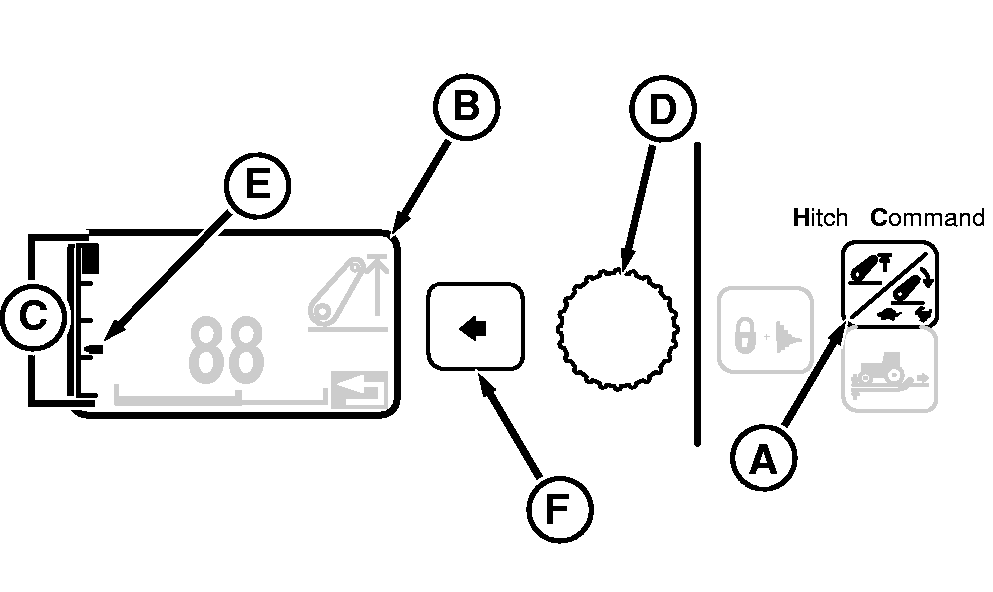
Setting Hitch Height LimitHitch height limit is adjusted in the CommandCenter. 1. Press Hitch Raise Limit / Rate-of-Drop Switch (A) once and observe Display (B); current height setting appears as a Height Bar Graph (C) on left-hand side.2. Turn Command Dial (D) counterclockwise to lower height limit setting; clockwise to raise setting. Changes to height setting take place immediately. Lowest height setting is limited to 25% of Hitch Position. Indicator (E) shows current hitch position. 3. When desired height is reached, press Select Switch (F) to return to previous display. |
|
OURX935,000044E -19-20SEP07-1/1 |