CommandCenter-Settings

Not all languages are displayed on CommandCenter. See Selecting Units and Language in this section for more information on languages that can be displayed.

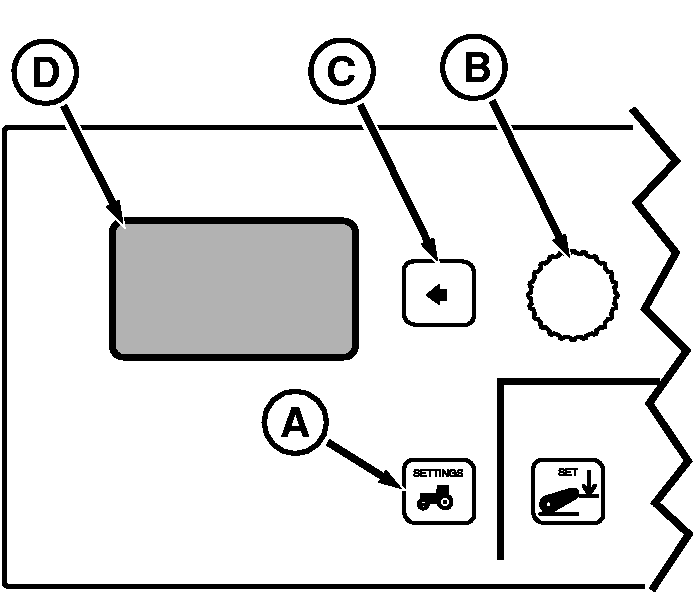
Press Vehicle Settings Switch (A) to view menu. Rotate Command Dial (B) to scroll through menu items. Press Select Switch (C) when desired item is highlighted in Display (D).

Menu items on Display (D)

English Translation (if applies) Implement Sel Implement Sel RPTO Engage RPTO Engage Transmission Transmission Single Lever Control (if Equipped) Single Lever Control (if Equipped) Hitch Slip Response (if Radar Equipped) Hitch Slip Response (if Radar Equipped) Speed Cal Speed Cal Day Backlight Day Backlight Night Backlight Night Backlight Display Contrast Display Contrast Units Units Language Language Clock Set Clock Set Diagnostics Diagnostics Service Interval Service Interval Back Back


To return to previous screen(s), highlight and select BACK.

For detailed information on setting Hitch Slip, see Setting Hitch Slip response in Hitch section.

RXA0085829


A-Vehicle Settings Switch
B-Command Dial
C-Select Switch
D-Display

OURX935,0000570 -19-31MAR06-1/1