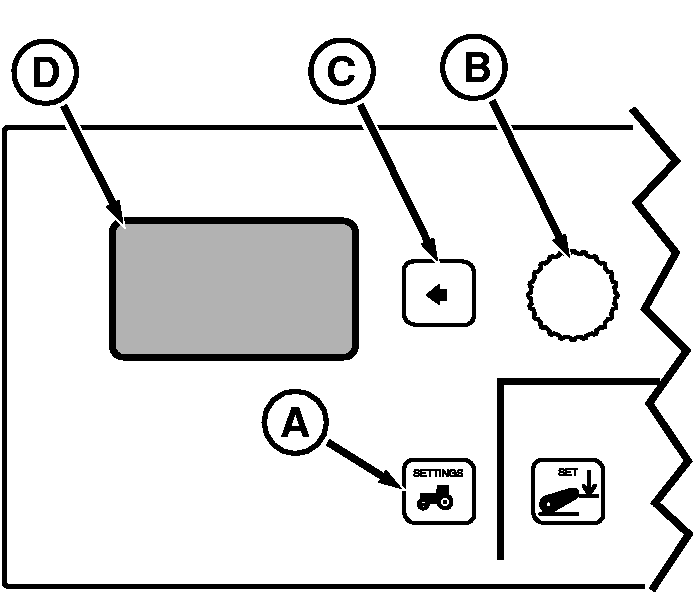
Setting Implement SelectionPress vehicle Settings Switch (A) to view menu items on Display (D). Rotate Command Dial (B) to highlight desired menu item and press Select Switch (C).
Menu Items on Display (D)
IMPLEMENT SEL: Identifies a device or system that supplies a feedback signal for measurement related bottom-half screens, such as Total Area, Area-per-Hour or Distance all of which include the implement position arrow. Position arrow indicates if implement is raised (arrow up) or lowered (arrow down). Measurements are being recorded only when the implement arrow is down. When HCU, SCV I, II, III, IV, V or RPTO is selected, measurement recording will not take place until the chosen device or system is engaged. Once selected and engaged, measuring cannot be turned off until the chosen device or system is disengaged. |
|
OURX935,0000573 -19-31MAR06-1/2 |
|
When Auto Seek is selected, the first detected "engaged" signal seen by the controller causes the implement arrow to point down and start accumulating measurements (distance and area). The code of the first detected device will highlight on the screen and change back to Auto Seek when that device is disengaged or, change to a different code if another device is already engaged. "AS" is shown at the end of implement code to indicate that the highlighted implement is engaged via the auto seek function. |
OURX935,0000573 -19-31MAR06-2/2 |