Setting IVT Options
Auto/PTO Options
Auto 2 Options
|
|
|
|
|
|
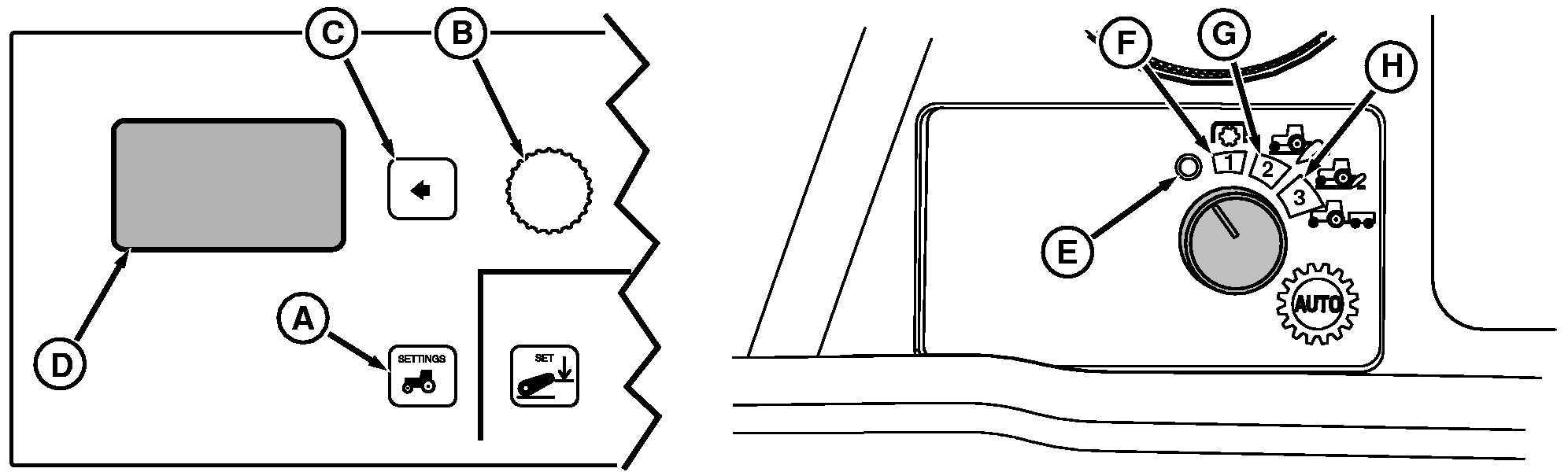
Press Settings Switch (A) to view menu items on display (D), rotate Command dial (B) to highlight Transmission Options and press SELECT switch (C). See IVT Options table for a list of selections to choose from. Using Command dial, highlight desired setting and press SELECT switch again. IVT Options
Either AUTO with PTO or AUTO-no PTO is used in conjunction with Position 1 (F) of the selector switch. Setting determines how much engine rpm "pull down" to allow under load, before transmission automatically downshifts. See Auto/PTO Options table for a list of selections to choose from. See Engine Speeds-IVT Options Auto With or Without PTO, for further information. NOTE: Using correct engine speed is very important for PTO operations. Refer to implement Operator's Manual for specific implement speeds. Run engine at 1817 engine rpm for |
540 rpm PTO speed and at 2000 engine rpm for 1000 rpm PTO speed operation. Field Cruise can be used to limit engine speed. Auto/PTO Options
Both AUTO 2 (G) and AUTO 3 (H) are fuel economy settings. AUTO 2 is used in conjunction with switch position 2 to adjust minimum engine speed when operating with a light load. See Auto 2 Options table for a list of selections to choose from. The default engine rpm setting in AUTO 2 is 1500 rpm.
|
OURX935,0000478 -19-14FEB06-1/2 |
Auto 3 Options
|
AUTO 3 is the same as AUTO 2, except it is used in conjunction with switch position 3. See Auto 3 Options table for a list of selections to choose from. The default engine rpm setting in AUTO 3 is 1200 rpm.
|
||||||||||||||||||||||||||||||||||||||||||||||||||||||||||
OURX935,0000478 -19-14FEB06-2/2 |