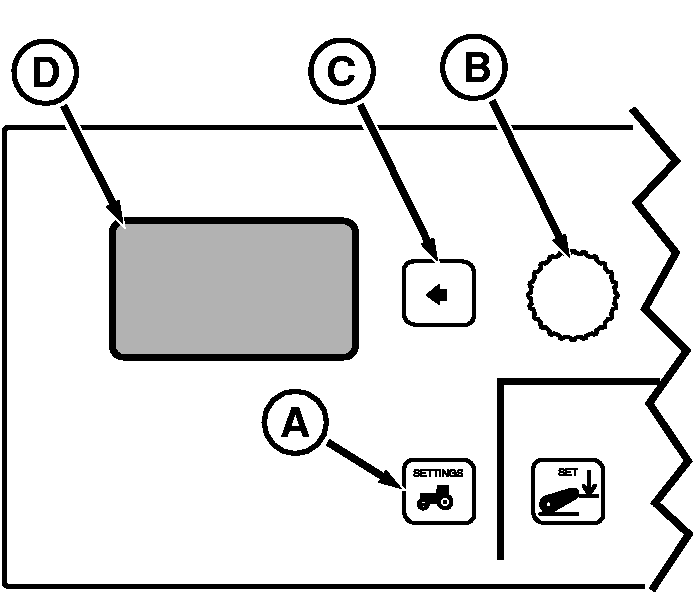
Vehicle Speed Calibration (Manual)NOTE: The Vehicle Speed Calibration (Manual) procedure is not to be used with John Deere Dual Beam Radar. Automatic vehicle calibration is used with John Deere Dual Beam radar or GPS signal device. See VEHICLE SPEED CALIBRATION (AUTOMATIC) in this Section. On tractors equipped with no radar or single beam radar, a change in tire size or loading of tractor can affect wheel and ground speed which requires recalibration. This procedure will compute tire rolling circumference value and radar proportion constant for the wheel and ground speed displays. 1. Install implement and ballast tractor as required for configuration.2. On a hard level dry surface, mark out a 400 ft. (122 m.) course. Place easily visible markers at the start and end of the course. 3. Drive tractor up to, but do not cross, course start line. 4. Press vehicle Settings Switch (A) to view menu items on Display (D). Rotate Command Dial (B) to highlight Speed Cal and press Select Switch (C). 5. Display will read:
6. Highlight 400 ft (122 m) , then press Select Switch.
|
|
|||||||||||||||||||||||
RW29387,000005B -19-02JAN08-1/2 |
7.
Set tractor speed to 3.2 km/h (2 mph) and press Select Switch as tractor crosses start line.
8. Drive entire course length at 3.2 km/h (2 mph) and press Select Switch when crossing the course end marker. NOTE:
Most common reason failed message is received is because tractor speed falls below
3. 2 km/h (2 mph).
9. If failed message is received, perform procedure again. |
|||||||||||||||||||||||||||||||||||||
RW29387,000005B -19-02JAN08-2/2 |