Adjusting Active Seat (If Equipped)
|
|
|
|
|
|
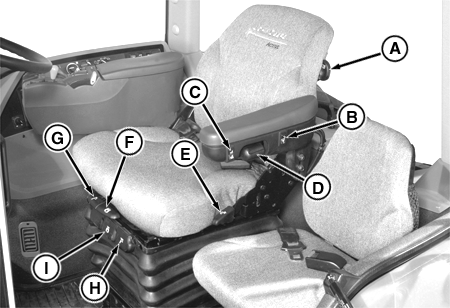
IMPORTANT: If single lever control is installed on CommandARM ™ , lever may contact right-hand console if seat is placed in full right-hand swivel position. Check seat swivel as well as seat height and fore-aft adjustment to avoid this contact. NOTE: Before operating tractor, adjust active seat to your height and weight. This will allow you to get the most from ride zone protection . Active seat has a built-in buffer at the high and low end of vertical seat travel, resulting in a much smoother ride. Lumbar Support Adjustment Rotate lever (A) to any of five positions. Ride Firmness Control Ride firmness switch (B) provides three different levels of seat suspension performance. Press upper portion "+" of switch for the firmest ride or lower portion "-" for the softest ride. |
Ride Zone Protection The seat is ride zone protected. The seat will automatically adjust back into the protected zone when operator adjusts the seat height position at or near the vertical seat travel limits. Height Adjustment NOTE: Compressor continues to operate until air system is optimized for the given seat height and operator weight. For best seat performance, position seat slightly lower than usual. Turn key switch to ON position. Press lower portion of switch (C) to lower the seat. Press upper portion of switch to raise the seat. Armrest Angle Adjustment Turn handle (D) to adjust armrest angle. Backrest Angle |
|
CommandARM is a trademark of Deere & Company | OURX935,0000485 -19-02AUG05-1/2 |
|
Pull up handle (E) and adjust backrest to desired angle. Seat Swivel Lift up on handle (F) to detent position to allow seat to swivel. Push down on handle to lock seat in position. Fore-Aft Seat Position Pull up on handle (G) to allow the seat to slide forward or backward. NOTE: Fore-Aft and Lateral Movement Locks should remain in the UNLOCKED position for maximum performance. |
Fore-Aft Movement Lock Push down on handle (H) to unlock fore and aft suspension. Pull up to prevent fore-aft movement. Lateral Movement Lock Push down on handle (I) to unlock lateral seat suspension. Pull up on handle to lock seat in position. |
OURX935,0000485 -19-02AUG05-2/2 |