CommandCenter™ Page Layout
NOTE:
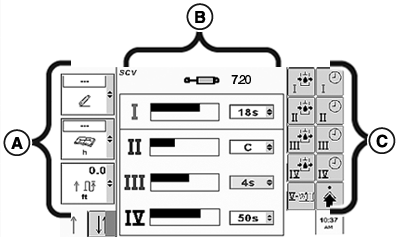
RXA0104279-UN-11AUG09
Example of Page Layout
A - Left Region
B - Center Region
C - Right Region
Displayed page shown is reference only. Actual pages may appear differently due to connection of optional devices and tractor configuration.CommandCenter™ Left Region (A), Center Region (B) and Right Region (C) selections will be active on most pages.
- A — Left Region: allows operator the ability to choose and monitor three left region boxes at a time. Each box displays an ongoing function or specific tractor status.
- B — Center Region: allows operator to view and change tractor settings in a wide variety of applications.
- C — Right Region: displays softkey options available to the operator from current page.
Selecting a Right Region softkey displays a new page, function, or allows changing settings.
Left Region boxes are displayed in a strip of three individual boxes to be monitored while allowing operator to focus on specific functions active in page Center Region.
|
CommandCenter is a trademark of Deere & Company |
OURX935,000011D-19-20101108 |