CommandCenter™ Input Fields

RXA0104741-UN-22SEP09
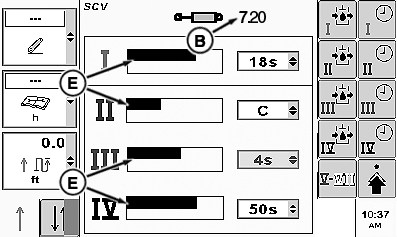
Example Of CommandCenter™ Drop Down Boxes, Check Boxes, Input Boxes, Softkeys, and Bar Graphs
RXA0100971-UN-09MAR09
Example Of Input Boxes And Bar Graphs
There are a variety of input fields and buttons that allow the operator to navigate through pages and the ability to change values.(A) — Drop-Down Boxes
Drop-down box has a border with a numeric or text value and up/down arrows on the right side that allow operator to select specific value from a pre populated list.
Highlight drop-down box and press Confirm button. List will appear. Rotating thumb wheel will allow operator to move indicator through list to desired input values. Pressing Confirm button will select new value.
To close drop-down box without making a selection, press Cancel button. List will close and original value will remain.
(B)—Input Box
Input box has a border with a numeric value or text. This allows the operator to select and enter new values or text.
NOTE: The faster thumb wheel is rotated, the faster values will incrementally change. Rotating thumb wheel forward increases value and rotating thumb wheel rearward decreases value.
To change a value, highlight input box and press Confirm button. Input box is highlighted indicating that thumb wheel can be rotated to change current value to desired value. When finished, press Confirm button to accept new value.
If there is a large range of values, a numeric key pad will appear, allowing selection of each digit.
(C)—Check Box
Check box is a square with a border. The function controlled by a check box will toggle on or off depending if box is checked or left unchecked respectively.
(D)—Softkeys
Press softkeys to activate a prescribed function or navigate to a page.
(E)—Bar Graph
To change a value, highlight bar graph and press Confirm button. Rotate thumb wheel forward to increase value or rearward to decrease bar graph value. When finished, press Confirm button to accept new value.
|
CommandCenter is a trademark of Deere & Company |
OURX935,000011F-19-20101108 |