Selecting Highlight Color
RXA0098156-UN-07NOV08
CommandARM™ Menu Button

RXA0103916-UN-14JUL10
CommandCenter Menu → Display → Advanced Settings Softkey → High Light Softkey
RXA0103713-UN-21JUL09
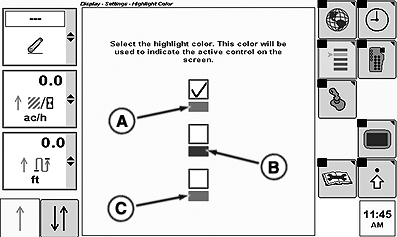
Display Setting Highlight Color Page
A - Green
B - Blue
C - Red
-
Select Menu button.
-
Select Display.
-
Select Advanced softkey.
-
Select Highlight softkey.
-
At Display Setting Highlight Color page, set highlight to green (A), blue (B), or red (C) by placing check in the appropriate check box.
|
CommandARM is a trademark of Deere & Company |
OURX935,0000121-19-20101104 |