Configuring Home Page
-
Select Menu button.
-
Select Layout Manager.
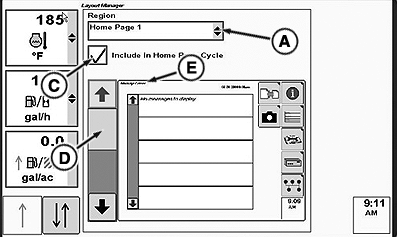
RXA0104152-UN-28JUL09Layout Manager—Selected Home Page
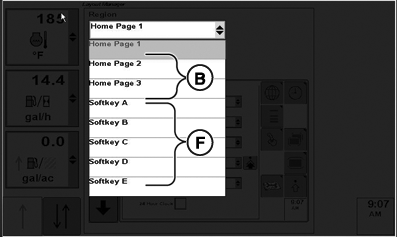
RXA0104150-UN-04SEP09Layout Manager—Drop Down Box Options
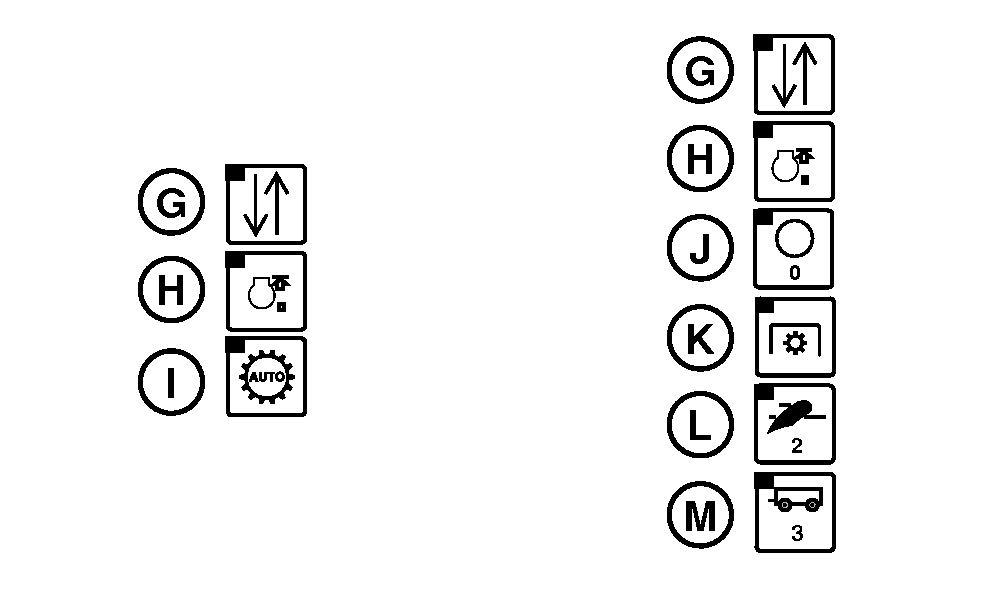
RXA0104311-UN-17AUG09Left Column PST Options and Right Column IVT/AutoPowr Options
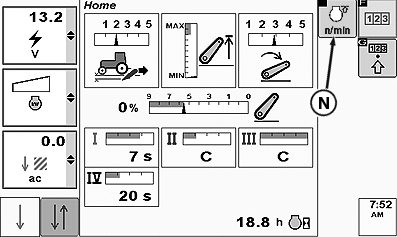
RXA0104312-UN-03SEP09Default Home Page With FieldCruise Softkey Selected
A - Home Page Drop Down Box
B - Home Page Options
C - Include In Home Page Cycle Check Box
D - Drop Down Box
E - Page Name
F - Softkeys Available
G - Area Status Counter Softkey
H - FieldCruise Softkey
I - APS Softkey
J - IVT/AutoPowr Auto Mode Off
K - IVT/AutoPowr Auto Mode 1
L - IVT/AutoPowr Auto Mode 2
M - IVT/AutoPowr Auto Mode 3
N - FieldCruise Softkey
-
Layout Manager opens to any previously displayed home page.
-
Select Home Page drop down box (A) displays options which include three home page options (B) and five softkeys options (F), A through E.
-
Place check in Home Page Cycle check Box (C) to have desired page displayed.
-
To view home pages after they are included in the home page cycle, on CommandARM™ select Home button displaying home page 1. Selecting Home button consecutively displays consecutive home pages, 1, 2, or 3.
NOTE: For PST softkey options are: Area Status Counter (G), FieldCruise™ ON/OFF (H) or Automatic Power Shift (I). For IVT/AutoPowr softkey options are: Area Status Counter (G), FieldCruise™ ON/OFF (H), IVT/AutoPowr Auto Mode off (J), IVT/AutoPowr Auto Mode 1 (K), IVT/AutoPowr Auto Mode 2 (L) or IVT/AutoPowr Auto Mode 3 (M).
Adding softkeys to a home page simply allows operator the ability to activate or deactivate a function from the selected home page.
Softkeys, FieldCruise softkey (N) for example, are only added to the default Home page.
-
Open drop down box (D) to select pages or softkeys available for your tractor configuration.
NOTE: Page Name (E) is printed across the top of page. All pages are not identified with a specific page.
-
To remove page from Layout Manager, select check box (C) again. Check box is unchecked and page is no longer displayed in Layout Manager.
|
CommandARM is a trademark of Deere & Company FieldCruise is a trademark of Deere & Company |
OURX935,0000127-19-20101104 |