Setting Alarm Volume
-
RXA0098156-UN-07NOV08CommandARM™ Menu Button
RXA0099747-UN-14JUL10Display
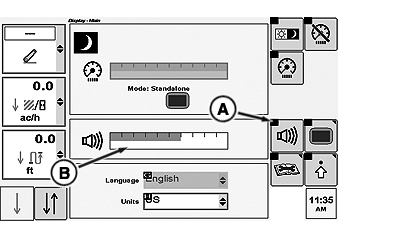
RXA0103981-UN-17JUL09Display Main Page
A - Adjust Volume Softkey
B - Adjust Volume Bar graph
Select Menu button. -
Select Display.
-
Select Adjust Volume softkey (A) to highlight Adjust Volume bar graph (B).
-
Using CommandArm Controls thumb wheel, rotate forward to increase or rearward to decrease alarm volume respectively.
|
CommandARM is a trademark of Deere & Company |
OURX935,000012B-19-20101104 |