Connecting ISO Implements and Multiple ISO Displays
 CAUTION:
RXA0098156-UN-07NOV08
CommandARM™ Menu Button
RXA0103918-UN-02AUG10
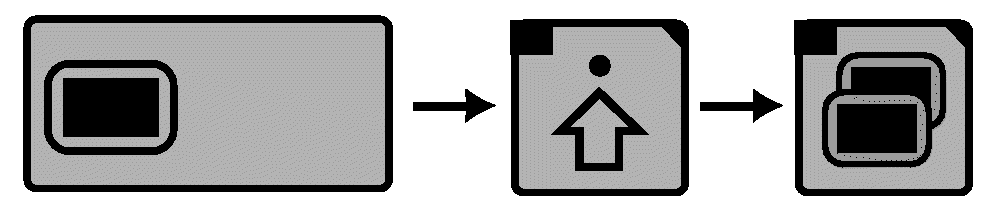
Display → Advanced Settings → Multiple Display
Implement DetectedImproper operation can cause unintended implement movement.
To avoid death or serious injury to a bystander, understand how this display operates the functions of the implement.
Read and understand the implement Operator Manual.
This message occurs when the system detects an ISOBUS implement. For more information, READ OPERATOR MANUALS FOR ISOBUS IMPLEMENTS.
-
Select Menu button.
-
Select Display.
-
Select Advanced Settings softkey.
-
Select Multiple Display softkey.
In some cases it may be necessary to operate with more than one ISO display. In such cases configure CommandCenter™ to operate in conjunction with a second ISO display.
General Recommendations:
- Ensure tractor ignition key is in OFF position when connecting alternate ISO displays or ISO implements.
- Turn tractor ignition key to OFF position for at least 15 seconds after changing any multiple display settings.
- Enable Implement Bus Virtual Terminal on only ONE ISO Display.
- Enable Original GreenStar™ Monitor on only ONE ISO Display.
- Enable Controller Reprogramming on Only ONE ISO Display.
|
Default Factory Settings for Multiple Display Page 1 |
||
|
ON/OFF |
FUNCTION INSTANCE |
|
|
Vehicle Bus Virtual Terminal |
√ (Checked) |
0 |
|
Implement Bus Virtual Terminal |
(Unchecked) |
1 |
|
Task Controller |
√ (Checked) |
0 |
|
File Server |
√ (Checked) |
0 |
|
Default Factory Settings for Multiple Display Page 2 |
||
|
ON/OFF |
||
|
Performance Monitor |
(Unchecked) |
|
|
Original GreenStar Monitor |
(Unchecked) |
|
|
GreenStar 2 Pro Application |
(Unchecked) |
|
|
Controller Programming |
(Unchecked) |
|
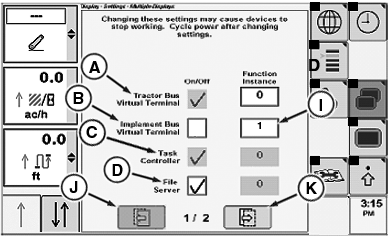
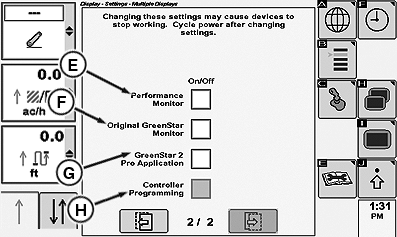
The CommandCenter™ factory default settings (Multiple Display Page 1 and Page 2 Images allow ISO implement and Original GreenStar Monitor to be viewed on alternate ISO display.
Use table below as a guide to assist multiple display configurations. When a specific box is checked, that option is enabled on the CommandCenter.
RXA0104733-UN-22SEP09
Multiple Display Page 1 (Default Settings)
RXA0104685-UN-16SEP09
Multiple Display Page 2 (Default Settings)
A - Tractor Bus Virtual Terminal Check Box
B - Implement Bus Virtual Terminal Check Box
C - Task Controller
D - File Server
E - Performance Monitor
F - Original Green Star Monitor
G - GreenStar 2 Pro Application
H - Controller Programming
I - Function Instance
J - Previous
K - Next
NOTE: Press Next (K) or Previous (J) to switch between the two Multiple Display pages.
NOTE: To enable or disable an option, use CommandArm Controls thumb wheel to navigate to appropriate check box, then press CommandArm Controls Confirm button to add or remove check mark.
|
Display Settings for Multiple Display Pages |
|
|
A—Tractor Bus Virtual Terminal |
Tractor Bus Virtual Terminal cannot be disabled. No adjustment required. |
|
B—Implement Bus Virtual Terminal |
Implement Bus Virtual Terminal cannot operate simultaneously on two ISO displays.
NOTE: Consult ISO implement or ISO display manual if function instance value should be changed. |
|
C—Task Controller |
Task Controller is enabled/disabled automatically based on vehicle type. No adjustment required. |
|
D—File Server |
Disable feature if the implement Bus Virtual Terminal is disabled. |
|
E—Performance Monitor |
Performance Monitor cannot operate on an alternate display. Enabling or disabling performance monitor will not effect CommandCenter functionality. |
|
F—Original GreenStar™ |
Original GREENSTAR Monitor cannot operate simultaneously on two displays.
NOTE: Original GreenStar Monitor functionality can only be viewed via Original GreenStar display, if equipped. |
|
G—GreenStar 2 System™ Pro applications |
GreenStar 2 Pro applications cannot operate on the CommandCenter™. Disable feature to operate GreenStar 2 Pro applications on GreenStar display. |
|
H—Controller Programming |
Controller Programming can only be conducted via one display.
|
|
CommandARM is a trademark of Deere & Company CommandCenter is a trademark of Deere & Company GreenStar is a trademark of Deere & Company GreenStar 2 System is a trademark of Deere & Company |
OURX935,000012C-19-20101104 |