Setting IVT™/AutoPowr™ Options
A Load Anticipation feature allows IVT (Infinitely Variable Transmission)™/AutoPowr™ to predict how much “hydraulic load” engine expects from activation of hitch or a particular SCV function. For this to be activated, SCV or hitch lever is placed in detented position when “hydraulic load” is decreasing. IVT/AutoPowr remembers that load change. When it detects the same lever starting movement in the opposite direction, it responds with a short engine rpm boost thus providing more power to better handle on-coming load increase.
For engine rpm see Load Control Function—Engine RPM Droop IVT/AutoPowr Options (Modes 1, 2, and 3) Auto With and Without PTO.
Load Control Function Settings
-
Select Transmission.
RXA0104032-UN-22JUL09Transmission → Advanced Settings Soft Key
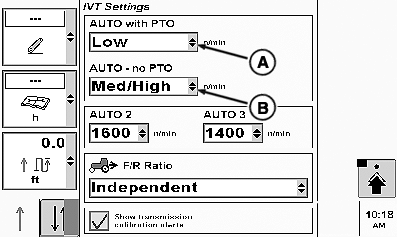
RXA0104051-UN-22JUL09IVT/AutoPowr Page
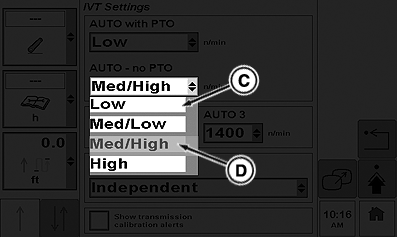
RXA0104052-UN-22JUL09Drop Down Box
A - Drop Down Box—AUTO with PTO
B - Drop Down Box—AUTO no PTO
C - Selection—Low
D - Selection—Med/High
-
Select Advanced Setting soft key.
-
When IVT/AutoPowr Settings page appears, select drop down box (A) to change AUTO with PTO setting.
NOTE: When selection is made in pull down menu, display in IVT/AutoPowr Settings Page will update automatically.
-
Make selection of options displayed. For this example; select LOW (C).
-
Using drop down box (B), follow above procedure to select setting AUTO—no PTO.
-
Drop down box will offer same options described above and for this example; select MED/HIGH (D).
Fuel Economy Function Settings
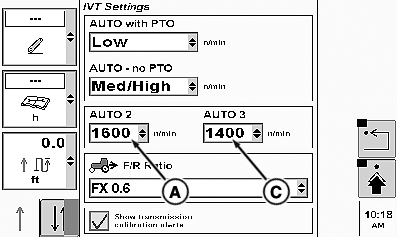
RXA0104053-UN-22JUL09
IVT/AutoPowr Settings Page
RXA0098452-UN-20MAR09
Drop Down Box
RXA0099606-UN-22OCT08
Drop Down Box
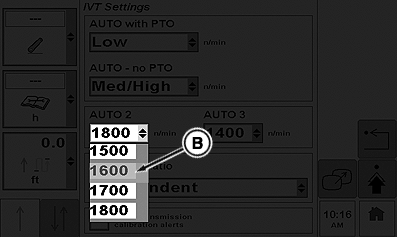
A - Auto Mode 2
B - Selection for Auto Mode 2
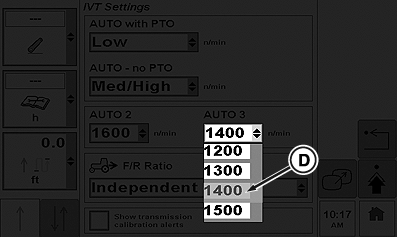
C - AUTO Mode 3
D - Selection for AUTO Mode 3
Both AUTO mode 2 and AUTO mode 3 are fuel economy settings. Auto mode 2 is used to adjust minimum engine speed when operating with a light load. See Auto Mode 2 Options table for a list of selections to choose from. The default engine rpm setting in AUTO mode 2 is 1500 rpm.
Auto mode 2 Options
|
IVT/AutoPowr Options |
Auto Mode 2 |
1500 rpm |
|
1600 rpm |
||
|
1700 rpm |
||
|
1800 rpm |
AUTO Mode 3 is much the same as Auto Mode 2, See Auto Mode 3 Options table for a list of selections to choose from. The default engine rpm setting in AUTO Mode 3 is 1200 rpm.
Auto Mode 3 Options
|
IVT/AutoPowr Options |
Auto 3 |
1200 rpm |
|
1300 rpm |
||
|
1400 rpm |
||
|
1500 rpm |
-
Select Auto Mode 2 engine rpm setting (A)
-
When drop down box appears, select desired setting. For this example, select 1600 (B) which will display in IVT/AutoPowr Settings screen for Auto Mode 2 rpm rate.
-
Select Auto Mode 3 engine rpm settings (C).
-
When drop down box appears, select desired setting. For this example, select 1400 (B) which will display in IVT/AutoPowr Settings screen for AUTO Mode 3 rpm rate.
|
IVT (Infinitely Variable Transmission) is a trademark of Deere & Company AutoPowr is a trademark of Deere & Company |
OURX935,0000142-19-20101108 |