Description And Display

RXA0103927-UN-24JUL09
iTEC
RXA0104054-UN-22JUL09
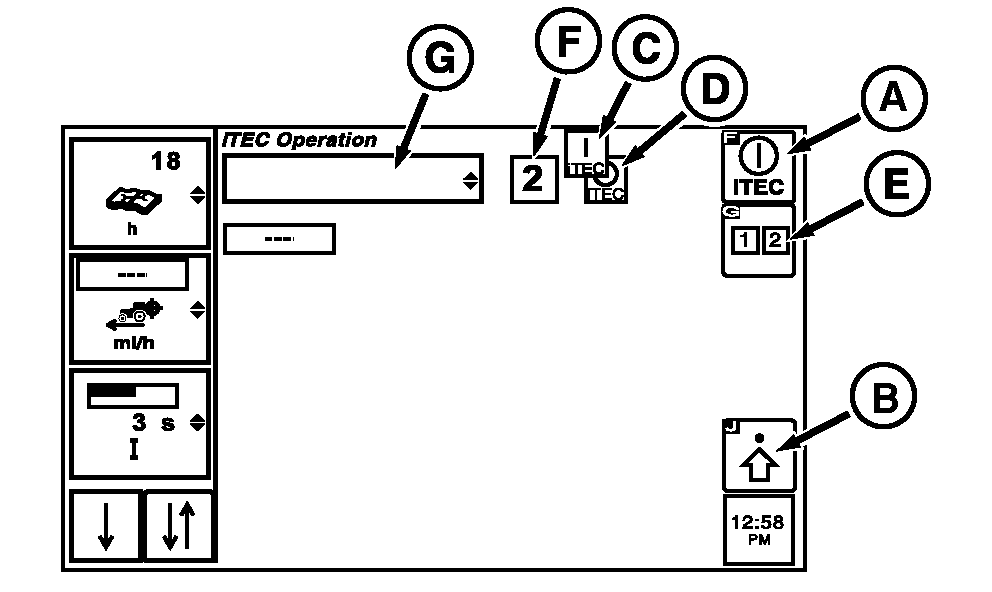
iTEC Operations Page
A - iTEC ON/OFF Softkey
B - Advanced Settings Softkey
C - iTEC —ON Indicator Box
D - iTEC—OFF Indicator Box
E - Sequence Softkey
F - Sequence In Process Indicator Box
G - Implement
Intelligent Total Equipment Control, iTEC™ allows multiple tasks to be performed with the touch of one switch.iTEC has two sequences in which learned functions are stored. A sequence is defined as the start of the first recorded function to completion of last recorded function.
NOTE: Tractor must be moving at a speed of at least 0.5 km/h (0.31 mph) to execute a sequence. Learned sequences will remain stored after engine stops.
A sequence is executed according to distance required to perform a series of functions when system is in LEARN mode. A maximum of 20 functions can be learned for each sequence. Learn Mode has a 60 second time limit and will stop recording events when time limit is reached.
-
Select iTEC.
-
Select iTEC ON/OFF softkey (A) to turn iTEC functions ON (C) or OFF (D).
NOTE: When iTEC is activated, observe box (F) to verify sequence activated and box (G) for implement currently in use.
-
Select Sequence softkey (E) when selected toggles between sequence 1 and sequence 2.
-
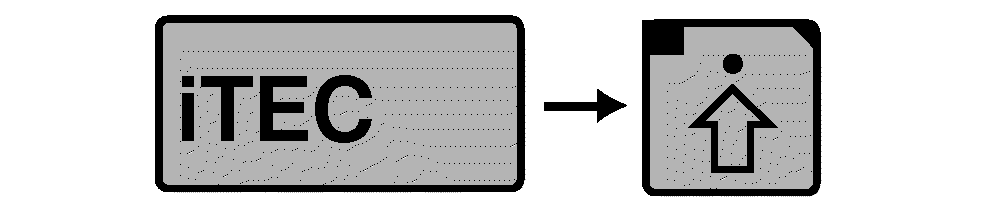
Select Advanced Settings softkey (B) to go to iTEC Edit Page.
At the iTEC Edit page:
RXA0104055-UN-22JUL09
iTEC→ Advanced Settings
RXA0099838-UN-02APR09
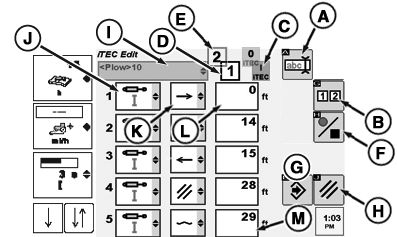
iTEC Edit Page
A - Edit Implement Name Softkey
B - Sequence Softkey
C - iTEC— ON
D - Sequence 1
E - Sequence 2
F - Start/Stop Record Sequence Softkey
G - Save Softkey
H - Cancel Softkey
I - Implement Identification Box
J - Edit Function Drop Down Box
K - Edit Operation Drop Down Box
L - Edit Distance Drop Down Box
- Softkey (A) navigates to edit implement name
- Softkey (B) toggles between sequence 1 and 2
- Box (C) visual notification that iTEC is ON
- Box (D) displays sequence 1 is active
- Box (E) displays sequence 2 is active
- Softkey (F) Start/Stop Record Sequence
- Softkey (G) Save Sequence
- Softkey (H) cancels operation and returns operator to operation page
- Drop Down Box (I) displays implement name currently selected
- Drop Down Box (J) is an example of a function.
- Drop Down Box (K) is an example of an operation.
- Box (L) is an example of the distance before function listed in left column will begin.
NOTE: If engine is not running, MFWD and the Differential Lock icons do not show up in function options list.
RXA0104555-UN-04SEP09
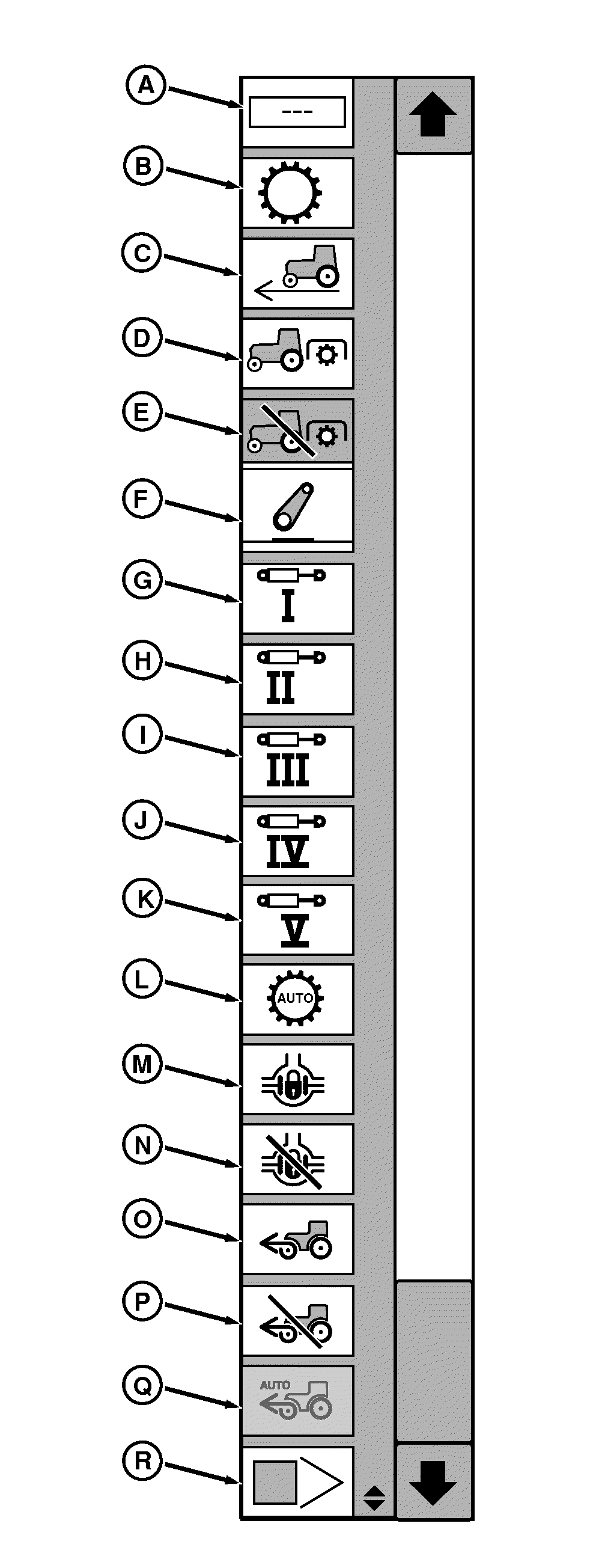
Functions
A - Delete
B - Transmission
C - Travel/Distance
D - PTO (ON)
E - PTO (OFF)
F - Hitch
G - SCV 1
H - SCV II
I - SCV III
J - SCV IV
K - SCV V
L - PST Auto
M - Differential Lock ON (Wheel Tractors Only)
N - Differential Lock OFF (Wheel Tractors Only)
O - MFWD (Wheel Tractors Only)
P - Brake Assist (Wheel Tractors Only)
Q - MFWD Auto (Wheel Tractors Only)
R - Insert (Used to shift sequences down while in edit mode)
iTEC Edit page function options are listed at right.
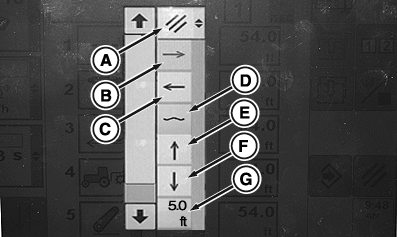
iTEC Edit page operations options are listed to the right.
RXA0101340-UN-31MAR09
Operations
RXA0101574-UN-02APR09
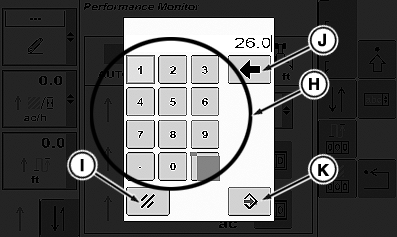
Key Pad
A - Cancel (Operation Field)
B - Extend (SCV Cylinders)
C - Retract (SCV Cylinders)
D - Float (SCV or Hitch)
E - Raise (Hitch)
F - Lower (Hitch)
G - Distance
H - Key Pad
I - Cancel (Key Pad)
J - Back Space (Key Pad)
K - Save/Enter (Key Pad)
Distance options are limited to selecting desired distance by pressing the individual keys, then pressing the Save/Enter key.
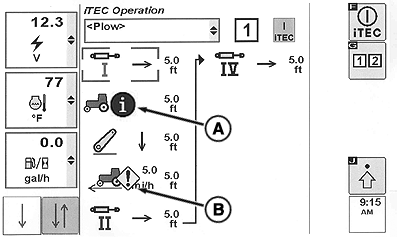
NOTE: A - Function Limited - Function not in correct state to be executed (Ex: PTO Switch Off).
B - Function Limited - Function will not execute and some conditions may be related to a Service Alert for that function. (Ex: PTO Switch Fault).
"Error/Service Alert icon" will always be the icon shown if the function will not execute while in execution mode - regardless of the reason.
RXA0103097-UN-27JUL09
Function Limited Alerts
A - Function Limited
B - Function Limited
|
iTEC is a trademark of Deere & Company |
OURX935,0000153-19-20101109 |