Operating Premium Radio Through CommandARM™ Controls
RXA0097745-UN-21APR08
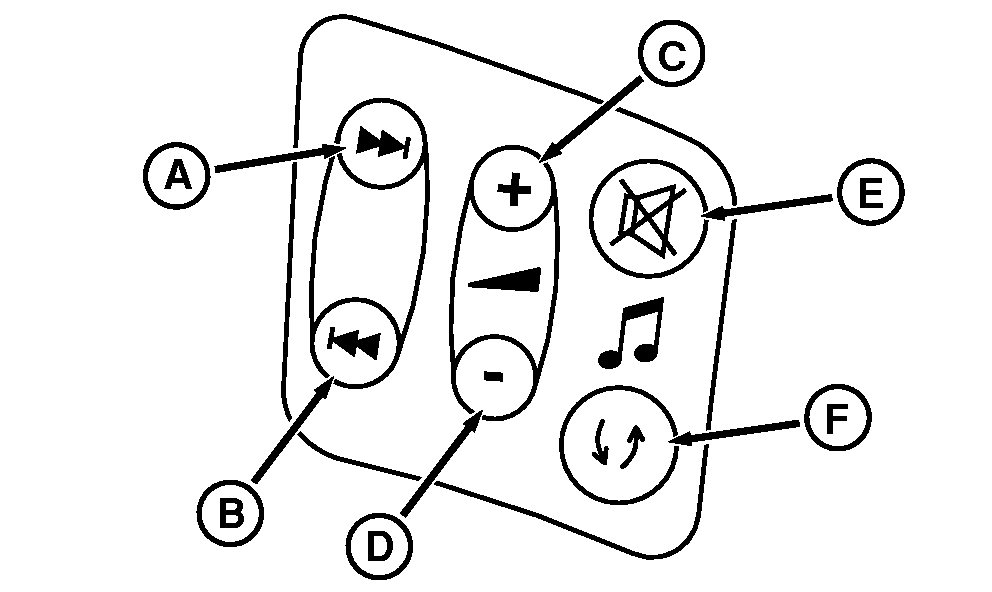
Radio Adjustment Buttons On CommandArm
RXA0100796-UN-25FEB09
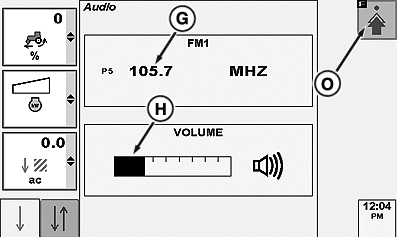
Audio Page
RXA0100798-UN-25FEB09
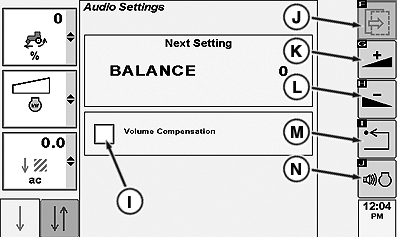
Audio Settings Page
A - Scan Preset Stations +
B - Scan Preset Stations -
C - Volume Button UP
D - Volume Button Down
E - Mute Button
F - Mode Selection (AM/FM/WB/CD/Aux)
G - Frequency Input Box
H - Volume Bar Graph Highlight
I - Volume Compensation Check Box
J - Next Softkey
K - Increase Softkey
L - Decrease Softkey
M - Return Softkey
N - Volume Compensation Softkey
O - Advance Settings Softkey
Press Scan Preset Station + button (A) to go to next higher preset radio station frequency or press Scan Preset Station button (B) to go to next lower preset radio station frequency. When frequency selection is made it will display in CommandCenter frequency input box (G).As Volume Control buttons C or D) are pressed, the volume bar graph high light (H) will move respectively to the right as volume increases or to the left as volume decreases.
Press Advanced Settings softkey (O) to access the following settings;
- Bass
- Middle
- Treble
- Fade
- Balance
- Eq—Manual
- Enable Volume Compensation
Pressing Next (J) scrolls through each of the above settings. Pressing Increase (K) or Decrease (L) adjusts the above listed settings.
Pressing Return (M) returns to previous page.
Pressing Volume Compensation highlights Volume Compensator check box (I) Placing check in box activates Volume Compensator with engine rpm increase or decrease.
|
CommandARM is a trademark of Deere & Company |
OURX935,0000159-19-20101109 |