Adjusting Drawbar Length, Height and Side-to-Side
Adjusting Drawbar Length
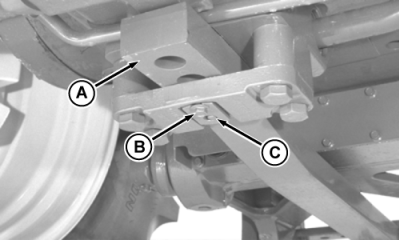
RW55309A-UN-22OCT99
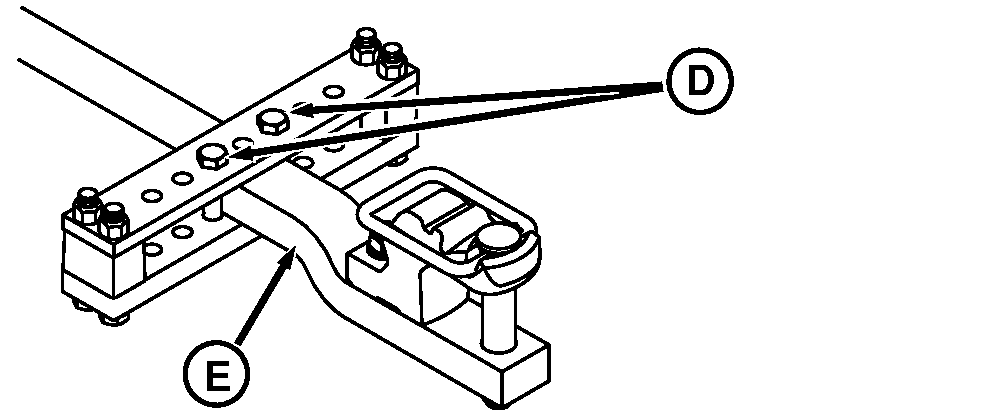
RXA0085803-UN-10JAN06
A - Drawbar
B - Cap Screw
C - Retaining Pin
D - Locking Bolts
E - Offset
IMPORTANT: For PTO-driven implement, drawbar (A) must be positioned as instructed in Attaching PTO Driven Implement in this section.
Loosen drawbar locking bolts (D).
Remove cap screw (B), retaining pin (C) and retaining strap.
Slide drawbar to desired position.
Install drawbar retaining strap and pin.
| Item | Measurement | Specification |
| Retaining Cap Screws | ||
| Cap Screw | Torque | 70 N˙m (50 lb-ft) |
Tighten drawbar locking bolts to torque specification.
| Item | Measurement | Specification |
| Drawbar Locking Bolts | ||
| Locking Bolts | Torque | 430 N˙m (318 lb-ft) |
Adjusting Drawbar Height
Height of drawbar is adjustable by turning offset (E) up or down. Proceed as in length adjustment. Slide drawbar all the way out and turn drawbar over.
IMPORTANT: Clevis assembly must always be on top of drawbar if used.
Heavy duty support cannot be used with drawbar offset positioned upward.
Adjusting Drawbar Side-To-Side
Remove drawbar locking bolts.
Slide drawbar to desired position.
Install a locking bolt against each side of drawbar. Tighten bolts to torque specification.
|
OURX935,0000665-19-20081125 |