Operating Deluxe Radio
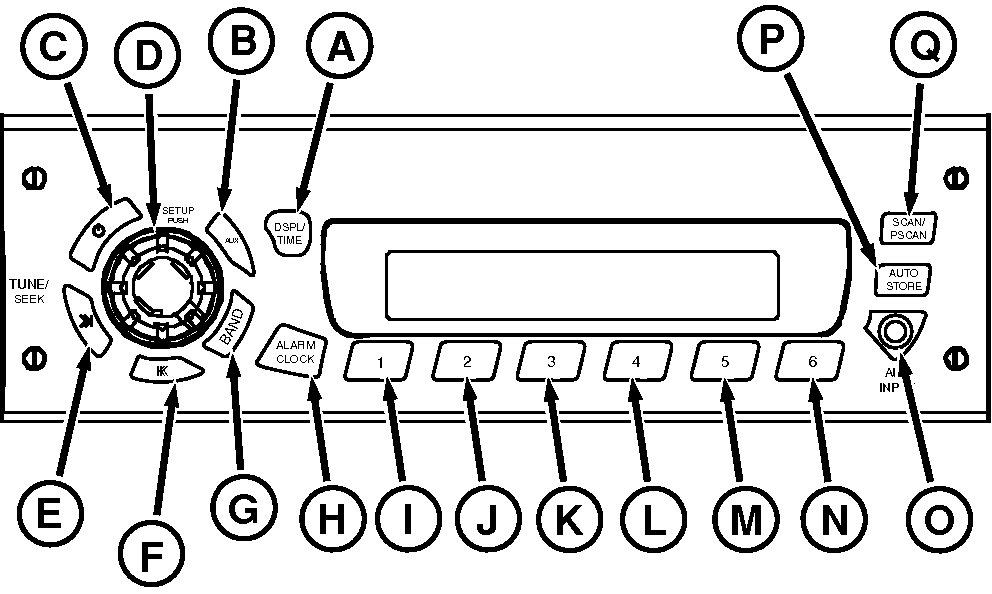
RXA0100009-UN-16DEC08
Radio
A - DISPLAY/TIME
B - AUX
C - Power
D - SETUP
E - Tune/Seek (+)
F - Tune/Seek (-)
G - BAND
H - ALARM CLOCK
I - Preset Station 1
J - Preset Station 2
K - Preset Station 3
L - Preset Station 4
M - Preset Station 5
N - Preset Station 6
O - AUX INPUT Port
P - AUTO STORE
Q - SCAN/PSCAN
Radio can be operated in any one of three modes:- Radio ON with tractor running.
- Radio ON with tractor not running, but tractor key switch ON.
- With tractor ignition OFF press radio Power Button, radio will play up to one hour, then shut off automatically.
Radio display can be changed to either time or station frequency
- Press and hold DISP/TIME button (A) for 3 seconds.
- Observe slow flash on display.
- Press preset station (any of buttons 1 through 6 (I through N).
- Wait three to five seconds, press DISP/TIME button to toggle between time or station frequency.
Operating Radio
Press On/Off (C) to turn radio on or off.
Press BAND (G) to switch between AM, FM1, FM2, or FM3 bands.
Press AUX (B) to play external device connected via auxiliary input port (O) to radio front panel.
Press SETUP (D) repeatedly to adjust bass, treble, fade, seek sensitivity, dim, balance and speakers. Rotate SET UP knob for adjustment. Adjust brightness of display by pressing SETUP until ”DIM” appears on display. Rotate SET UP knob to adjust.
Press TUNE/SEEK (E or F) buttons quickly to ”tune” or search for the next higher or lower frequency and radio will stop on that frequency even if no station exists . Holding Tune/Seek buttons longer than half a second initiates seek function. Seek function stops at next higher/lower frequency with a strong radio signal.
Press ALARM CLOCK (H) to enter alarm set mode, see Setting Deluxe radio Alarm and Clock in this section.
Plug external audio devices into AUX INPUT (O).
Pressing SCAN/PSCAN (Q) buttons to scan all stations on band you are using. When a strong frequency is found, radio will play for 8 seconds before continuing scanning. Display will show PSCN, frequency, preset number, and current band. Preset scan will continue until you press SCAN/PSCAN button again.
Storing Preset Stations (I through N)
- Select FM1, FM2, FM3, or AM.
- Tune to desired station.
- Press and hold one of the six preset buttons (I through N) to store selected station.
- Repeat procedure for remaining preset buttons.
Press AUTO STORE (P) until ”AUTO” and the ”AS” icon appear to automatically store six strongest stations of a selected band. Press AUTO again to restore original presets.
Playing Preset Stations
Press appropriate button 1-6.
|
OURX935,0000AE5-19-20090904 |