Setting Clock—Premium Radio
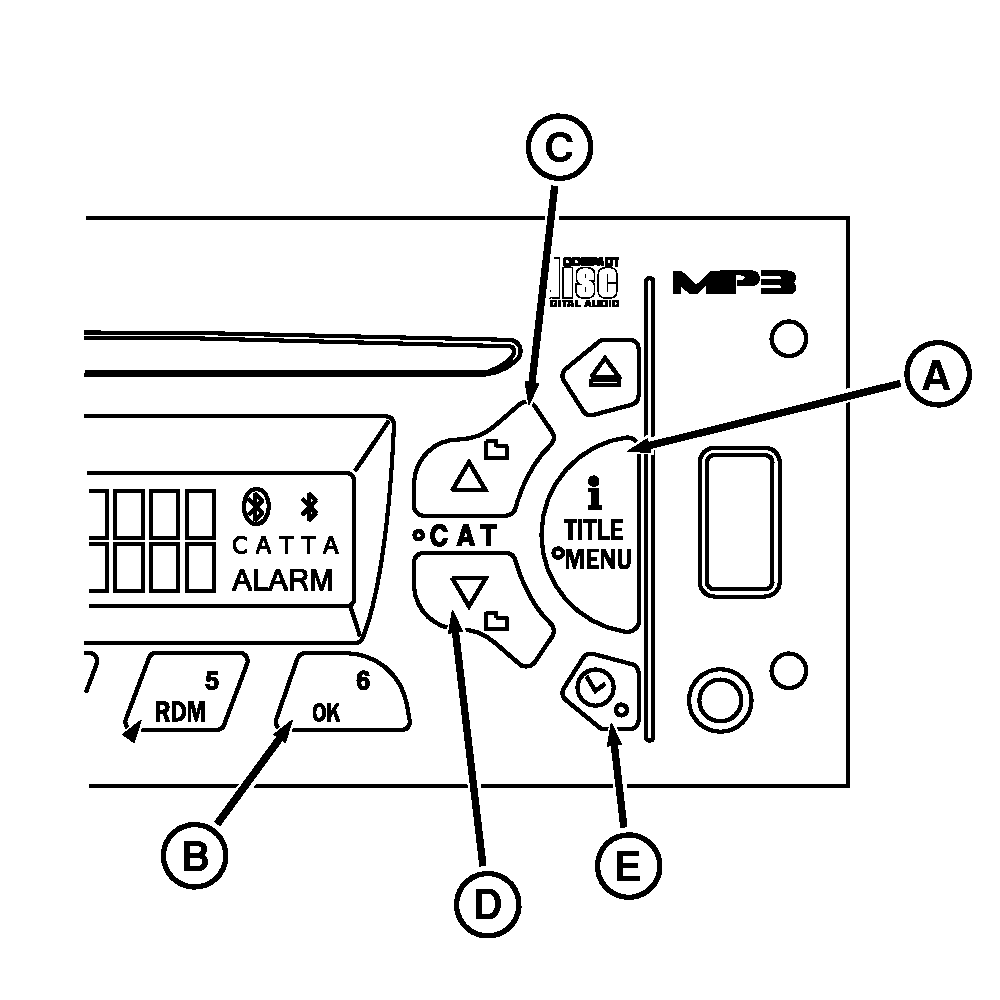
RXA0100807-UN-06MAR09
Setting The Clock
A - iTitle/Menu Button
B - OK Button
C - UP Button
D - Down Button
E - Clock Alarm Button
Clock function in 12-hour mode distinguishing between AM and PM or 24-hour mode displays military time. Clock is displayed when tractor key switch is on and radio is off. With radio and ignition off, display is blank.Setting the Clock
-
Turn tractor key switch on.
-
Press and hold ”i Title/Menu” button (A) for more than 2 seconds until Menu is displayed.
-
Press OK button (B) to enter clock submenu.
-
Turn AUDIO knob or press up button (C) or Down button (D) to change to SET TIME. Press OK button to enter set mode.
-
Turn AUDIO knob or press up/down buttons to change between 12-hour or 24-hour format. Press OK button to select one.
-
Display changes to clock configuration, causing hour digits to flash. Rotate AUDIO knob or press up/down buttons to change hour. Rotating knob clockwise while pressing up button will increase hour, rotating counterclockwise while pressing down button will decrease hour.
NOTE: At any point in the time set process not pressing a button or rotating knob within 8 seconds will cancel time set mode, return radio to normal operation and keep whatever setting changes that have been made. Pressing Power button or band buttons sets clock at whatever time selected.
-
Press OK button. Minute digits begin flashing. Rotate knob clockwise while pressing up button will increase minutes, rotate counterclockwise while pressing down button will decrease minutes.
|
OURX935,0000AEC-19-20090904 |