Setting the Alarm—Premium Radio
RXA0100811-UN-06MAY09
Setting The Clock
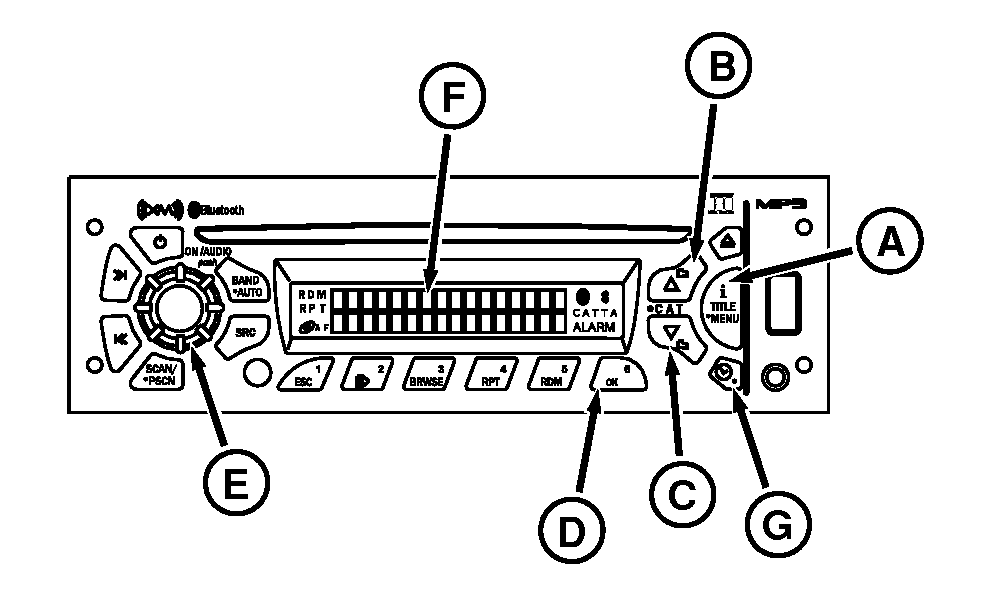
A - iTitle Menu
B - Up Button
C - Down Button
D - OK Button
E - Audio Knob
F - Display
G - Clock Alarm Button
Setting the Alarm-
With radio on, press and hold “i Title/Menu” button (A) for more than 2 seconds until Menu displays.
-
Rotate AUDIO knob (E) or press Up button (B) or Down button (C) to change to SET ALARM. Press OK button (D) to enter alarm submenu.
-
Press OK button to turn on or off alarm. Alarm icon displays when enabling alarm. Rotate Audio knob or press up/down buttons to change to SET TIME and press OK button. Hour digits for the alarm time will begin to flash. Format is the same as set for clock.
-
Rotate Audio knob or press Up/Down buttons to change hour. Rotating knob clockwise and pressing up button increases hour. Rotating counterclockwise and pressing Down button will decrease hour.
NOTE: SET MUS, alarm sound is the same as the setting when radio was turned off. For example: Alarm heard is the same station last tuned to. If last station is no longer available, alarm sounds a medium priority tone for 2 minutes before changing to a high priority tone. If AUX input, a CD or other media were last used and there is no longer AUX input or CD available, the alarm reverts to radio.
-
Press OK button causing minute digits to flash. Rotate Audio knob or press up/down buttons to change minutes. Rotating knob clockwise and pressing up button will increase minutes. Rotating counterclockwise and pressing the down button will decrease the minutes.
NOTE: NOTE: If SET TONE is selected, alarm will sound medium priority tone for 2 minutes before changing to constant high priority tone.
-
To set alarm time, press OK button. Select between SET MUS (Music) or SET TONE, then press OK button.
-
Press OK button again to set alarm tone or music volume. Press OK Button, VOLUME is displayed as actual volume of the tone or music is heard. To increase volume, rotate the Audio knob clockwise or counterclockwise to to decrease volume.
NOTE: At any point in the time set process, not pressing a button or rotating knob within 8 seconds will cancel time set mode, return radio to normal operation and keep whatever setting changes have been made.
-
Press OK button again to finish and return display to normal operation. ALARM icon will appear on display indicating alarm is active.
Turning Alarm Off:
When alarm is triggered, press and hold CLOCK/ALARM button (G) until ALARM icon on display disappears. If not held, it will automatically shut off after 63 minutes. Radio will return to mode (on or off) it was in before alarm sounded.
Activating Snooze Mode:
Press any button for less than 2 seconds when alarm sounds. SNOOZE will appear on radio display for 3 seconds and alarm will be postponed for 9 minutes. If any button is pressed during the 3 seconds, radio will return to the mode it was in before alarm sounded.
|
OURX935,0000AED-19-20090904 |