Setting up Hands Free (Bluetooth®) Mode – Premium Radio
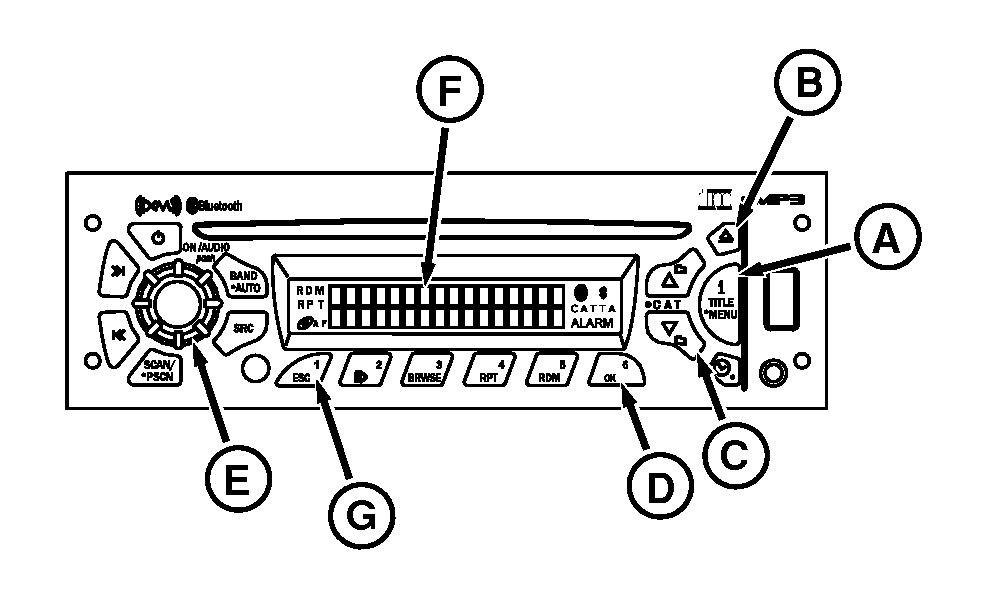
RXA0102670-UN-06MAY09
Setting Up BLUETOOTH Mode
A - iTitle Menu Button
B - Up Button
C - Down Button
D - OK Button
E - Audio Knob
F - Display
G - ESC Button
Premium Radio has hands free capabilities through BLUETOOTH technology. Up to 16 mobile phones can be saved to Premium Radio at one time.NOTE: Ensure device being paired is BLUETOOTH capable and has been enabled.
-
Press and hold I Title Menu button (A) until audible beep.
-
Rotate AUDIO knob (E) or press up/down buttons (B and C).
-
When HANDS FREE appears on display (F), press OK button (D).
-
Rotate AUDIO knob or press up/down buttons and select ON.
-
Press OK button.
NOTE: BLUETOOTH Status icon (icon) should appear on radio display.
Add Phone
-
Rotate AUDIO knob or press up/down buttons.
-
Watch display and select ADD PHONE by pressing OK button.
NOTE: When ADDING PHONE appears on display, radio is scanning for BLUETOOTH devices. Ensure paired BLUETOOTH device has been set to add a device and is searching for DEA355 Radio.
After 3 minutes, if no phone is added, radio displays NO PHONE FOUND.
-
ADDING PHONE will appear on radio display for 3 seconds and BLUETOOTH (icon) will blink up to 3 minutes.
-
Use PIN number 0000 to connect to radio.
NOTE: When mobile phone is successfully added to radio, PHONE CONNECTED will appear on display first line. Radio display second line will show BLUETOOTH phone name for 3 seconds.
Edit Phone:
-
Rotate AUDIO knob or press up/down buttons and when EDIT PHONE appears on display, press OK button.
-
The radio will display a list of mobile phones added.
NOTE: If 16 have been stored, the ADD PHONE option is disabled until a phone is deleted.
-
To delete a mobile phone, rotate AUDIO knob or press up/down buttons to select desired mobile phone, then press OK button.
-
Phone is deleted, and radio display returns to previous menu display.
Answer Phone:
-
To accept incoming call, press OK button.
-
To reject incoming call, press ESC button (G).
|
Bluetooth is a trademark of Bluetooth SIG |
OURX935,0000AF3-19-20090904 |