Configuring Selective Control Valves On CommandCenter™
RXA0102613-UN-06MAY09
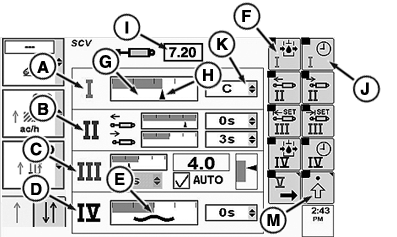
SCV Page
RXA0102608-UN-06MAY09
A - SCV I—Standard Mode
B - SCV II—Independent Mode
C - SCV III—Feature Mode
D - SCV IV—Float Operation
E - Float Symbol
F - Detent Flow Soft Key
G - Flow Bar Graph
H - Current Flow Bar Graph Indicator
I - Detent Flow Box
J - Detent Time Soft Key
K - Detent Time Drop Down Box
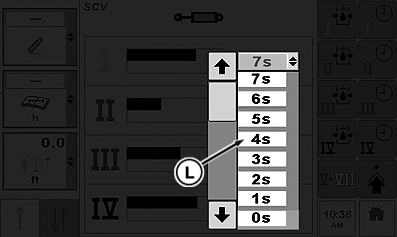
L - Detent Time Selections
M - Advanced Settings Soft Key
Each SCV can be configured to three different modes: standard mode displayed in SCV I (A), independent mode displayed in SCV II (B) or feature mode displayed in SCV III (C).NOTE: Current estimated SCV flow is indicated by current flow bar graph indictor (H).
Additionally when SCV is set to float as in SCV IV (D) the COMMANDCENTER display for that individual SCV will show the float symbol (E).
Standard Mode
SCV I in standard mode has flow and detent time setting which adjusts both extend and retract.
-
Press Detent Flow soft key (F) to highlight flow bar graph (G).
NOTE: Current flow bar graph indicator depicts amount of flow. Flow is displayed in increments of 0.04 beginning at 0.04 through 10 in box (I).
Current estimated SCV flow is indicated by the flow bar graph indictor (H).
-
Rotate CommandARM™ controls thumb wheel forward or rearward while watching current flow bar graph indictor (H) move right or left respectively. Value in detent flow box (C) increases or decreases as thumb wheel is rotated.
NOTE: When selected, detent time drop down box (K) will display amount of time in 1 second increments up to 10, then increments of every two seconds; 12, 14, 16, 18, up to 20, then 25, 30, 40, 50, 60, 90 seconds or C for continuous.
-
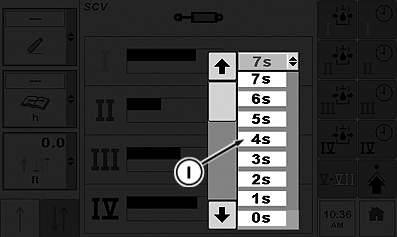
Using Confirm button select detent time soft key (J) to navigate to detent time drop down box (K). Open drop down box displaying available detent time selections (L).
-
Press Confirm button to select desired time. Desired time will now appear in drop down box (E).
NOTE: To set any SCV in independent mode select advanced settings indicator (M).
Independent Mode
RXA0102780-UN-05JUN09
SCV Page
RXA0101834-UN-08APR09
SCV Page
RXA0101978-UN-08APR09
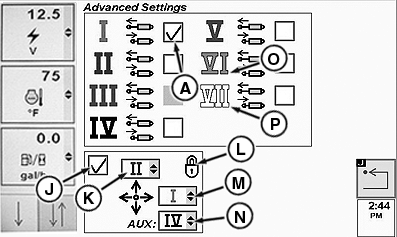
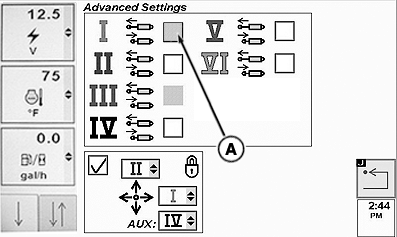
A - Independent Mode Check Box
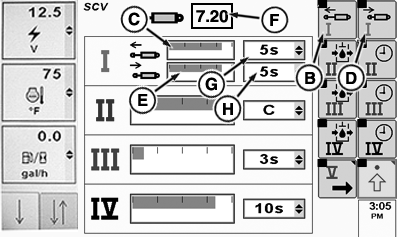
B - Extend Flow Soft Key
C - Extend Flow Bar Graph
D - Retract Flow Soft Key
E - Retract Flow Bar Graph
F - Detent Flow Box
G - Extend Detent Time Drop Down Box
H - Retract Detent time Drop Down Box
I - Detent Time Selections
J - Single Lever Control Check Box
K - Fore/Aft SCV Drop Down Box
L - Lock (Single Lever Control)
M - Side to Side SCV Drop Down Box
N - Aux SCV Drop Down Box
O - SCV VI Icon
P - SCV VII Icon
-
NOTE: Although SCV VI icon (O) and SCV VII icon are both displayed in this depiction, under normal conditions either SCV VI or SCV VII would be displayed at any given time.
At the advanced settings page, place check in independent mode check box (A).
-
SCV I now has unique flow and detent times which are adjusted by selecting extend soft key (B), highlighting extend flow bar graph (C). Selecting retract soft key (D) highlights retract flow bar graph (E).
NOTE: Bar graph depicts amount of flow. Flow is displayed in increments of 0.04 beginning at 0.04 through 10 in detent flow box (F).
-
Rotate thumb wheel forward or rearward while watching specified bar graph indictor move right or left respectively. Value in detent flow box (F) increases or decreases as thumb wheel is rotated.
NOTE: Detent time drop down box (G for extend or H for retract ) will display amount of time in 1 second increments up to 10, then increments of every two seconds; 12, 14, 16, 18, up to 20, then 25, 30, 40, 50, 60, 90 seconds or C for continuous.
-
Using thumb wheel, navigate to drop down box (G or H), then press Confirm button.
-
When drop down box opens, rotate thumb wheel to detent time selections (I) and press Confirm button.
-
Desired detent time now appears in respective drop down box (G or H).
Advanced Settings Page—Single Lever Control
NOTE: When activating/deactivating single lever control (J) assigned SCV s detent times are zeroed.
Single lever control check box (J) when checked, gives control of SCV to single lever control. When unchecked, SCV is controlled by SCV lever. Fore/Aft drop down box (K) allows any SCV I through SCV V to be selected. Side to Side drop down box (M) allows any SCV I through SCV V to be selected. Aux drop down box (N) allows any SCV I through SCV V to be selected. Lock (L) indicates lock/unlock state of single lever control.
Feature Mode
RXA0102101-UN-19MAY09
SCV Page Advanced Page
RXA0102614-UN-06MAY09
SCV Page
RXA0102615-UN-06MAY09
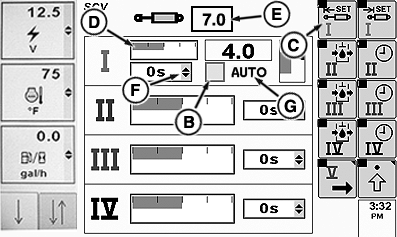
A - Independent Mode Check Box
B - Feature Mode Check Box
C - Extend Set Soft Key
D - Detent Flow Bar Graph
E - Detent Flow Value Box
F - Detent Time Drop Down Box
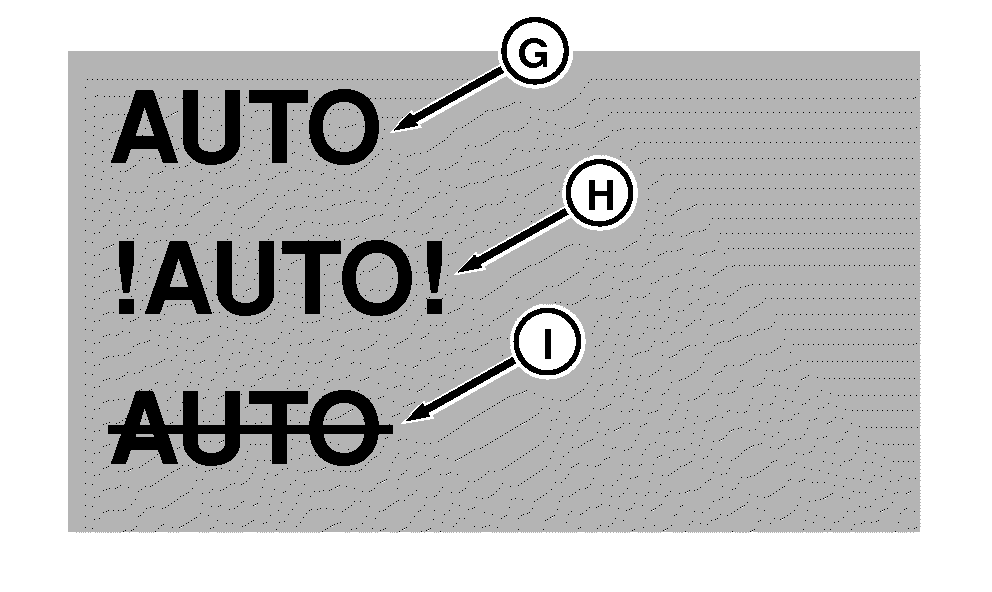
G - Feature Status Indicator (Normal Operation)
H - Feature Status Indicator (Fault Identified)
I - Feature Status Indicator (Turned Off)
NOTE: To use feature mode, connect implement to tractor. SCV page with feature option will be displayed for selected SCVs. On advanced page, specified SCV independent mode check box (A) is grayed out.
Available feature modes are:
- TouchSet™ control
- Laser Scraper control
- AccuDepth™ control
-
NOTE: When connected through can bus or implement connector, SCV (s) will automatically enter feature mode.
Connect tractor to implement.
NOTE: Detent time drop down box (F) can only be adjusted when feature mode check box (B) is un-checked. See Standard Mode. If feature mode check box is checked, detent time cannot be adjusted. See Standard Mode when adjusting detent time.
-
Rotate thumb wheel to bar graph (D). Press Confirm button to highlight. Rotate thumb wheel to adjust flow.
NOTE: As in previous SCV applications, bar graph (D) will depict detent flow and amount of detent flow will be shown in box (E).
“AUTO” (G) displayed indicates normal feature operation. “!AUTO! (H) indicates there is a fault and feature mode is inoperable. “AUTO “with a slash across it (I) indicates that AUTO is not active.
-
To adjust detent, rotate thumb wheel to check box (B) to the left of “AUTO” (G), then press Confirm button. AUTO will have a slash across it, the check box will be unchecked.
|
CommandCenter is a trademark of Deere & Company CommandARM is a trademark of Deere & Company TouchSet is a trademark of Deere & Company AccuDepth is a trademark of Deere & Company |
OURX935,0000B1D-19-20090902 |