Using Hitch Command Lever
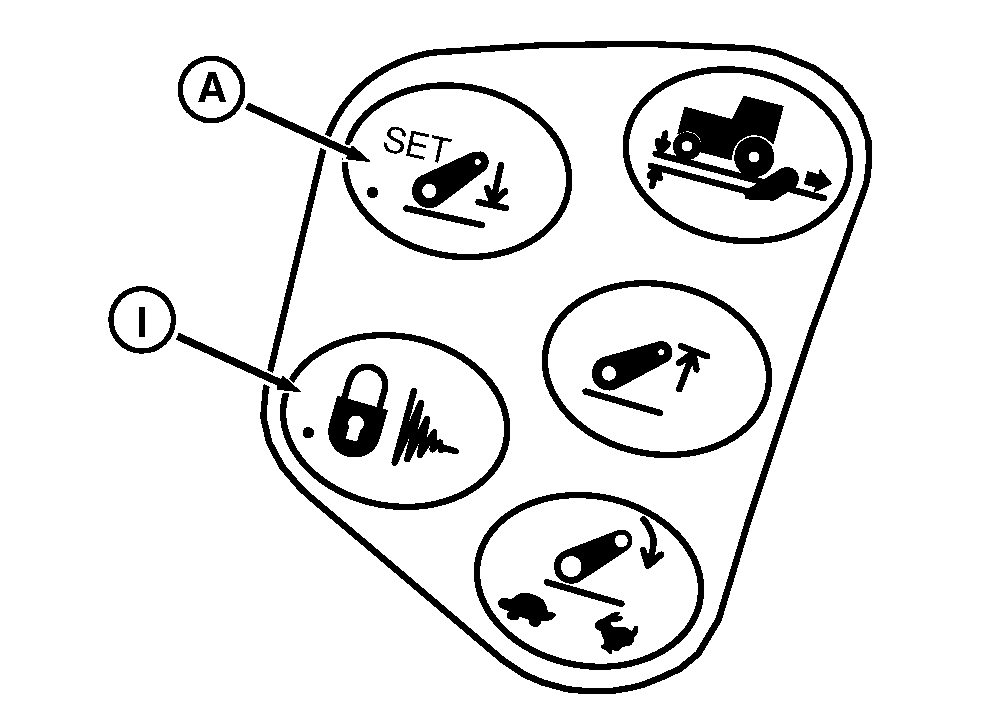
RXA0101477-UN-31MAR09
CommandARM™ Controls
RXA0104294-UN-11AUG09
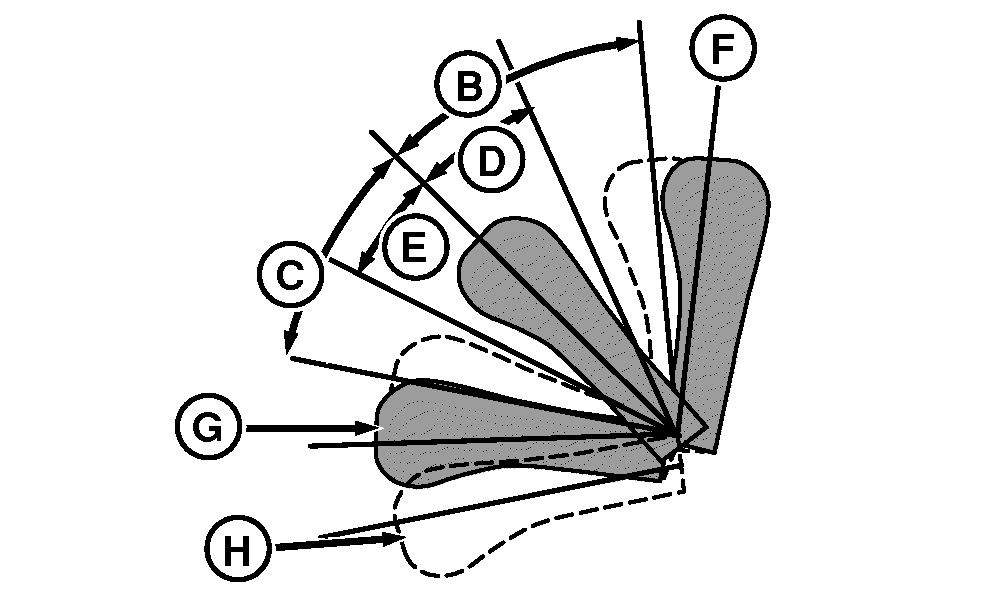
Hitch Lever
A - Hitch Lower Limit Button
B - Hitch Raise—Fast
C - Hitch Lower—Fast
D - Hitch Raise—Slow
E - Hitch Lower—Slow
F - Detent Position, Raise
G - Detent Position, Lower
H - Float Position
I - Hitch/Lock Dampening Button
- Lever will not raise hitch above upper height limit, but will move hitch below the saved depth setting.
- A short duration ”flick” of the lever into proportional region will change depth command by a fixed amount.
Lever movements within the proportional region (D and E), commands hitch to raise or lower. Raise or lower rate depends on how far the lever is moved from center position. Push lever down to lower hitch; pull lever up to raise hitch.
Setting Depth
- Each time Hitch Lower Limit button, the previous depth setting is erased and the current depth is saved as the new setting.
- Operating depth can be pre-set before field operation. Hold lever forward until depth command reaches desired value, then store by pressing Depth Set Switch.
Use lever to move hitch to desired operating depth, then press Hitch Lower Limit button (A) to store in memory.
Lever Detents
- If lever is held in the forward detent while lowering, hitch will lower beyond saved depth setting. If tractor is moving, hitch will raise to stored depth when lever is released.
- Depth can be varied by moving lever in the proportional region. Pushing lever into forward detent and releasing will return hitch to saved depth setting.
When lever is pulled into detent (F) and released, hitch raises to upper height limit. When pushed into detent (G) and released, hitch lowers to stored depth.
Lever Float
Float position (H) holds hitch lower valve open continuously and is useful when detaching an implement. See Using Float Operation in this section for proper setup if implement requires that hitch floats during field operation.
Lock/Dampening
 CAUTION: To prevent possible injury and equipment damage, set
hitch lock and dampening ON before transporting.
CAUTION: To prevent possible injury and equipment damage, set
hitch lock and dampening ON before transporting.
- If hitch leaks down while tractor is stopped, hitch will return to locked height when tractor begins moving.
- Hitch command lever is disabled so hitch cannot be lowered (but can be raised back up to the locked position if lever held in detent).
- Hitch dampening interrupts tractor pitching/rocking that can occur when transporting hitch-mounted equipment.
Before transport or during operations when hitch is not used, raise hitch with lever then press Hitch Lock / Dampening button (I). This locks the hitch and enables hitch dampening.
To unlock hitch and turn dampening off, press Hitch Lock /Dampening button again.
|
CommandARM is a trademark of Deere & Company |
OURX935,0000B1F-19-20090916 |