Configuring Tractor For GPS/Radar

Tractors equipped with radar must be re-configured when switching to GPS receiver as the true ground speed input signal. To configure tractor:

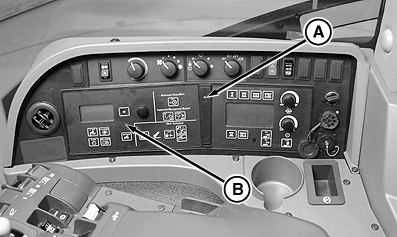
1. Remove screw (A) and CommandCenter (B).
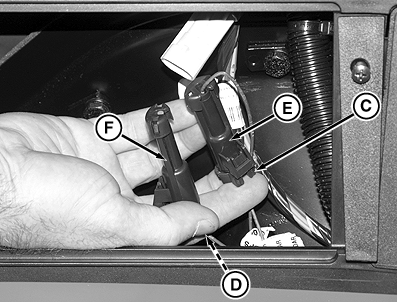
2. Inside right-hand console locate one wire lead marked "GPS" and one marked "Radar".
3. Remove radar plug (C) from wiring connector (E).
4. Remove GPS plug (D) from dust cap (F).
5. Install GPS plug into connector and radar plug into dust cap.
6. Install CommandCenter with previously removed screw.

Tractors not equipped with radar, but wanting to add a GPS signal require two controller addresses to be changed. Contact your John Deere dealer for assistance.


A-Screw
B-CommandCenter
C-Radar Plug
D-GPS Plug
E-Connector
F-Dust Cap

RXA0082000

Remove CommandCenter panel

RXA0082002

Connect GPS

OURX935,00001D1 -19-24MAR09-1/1