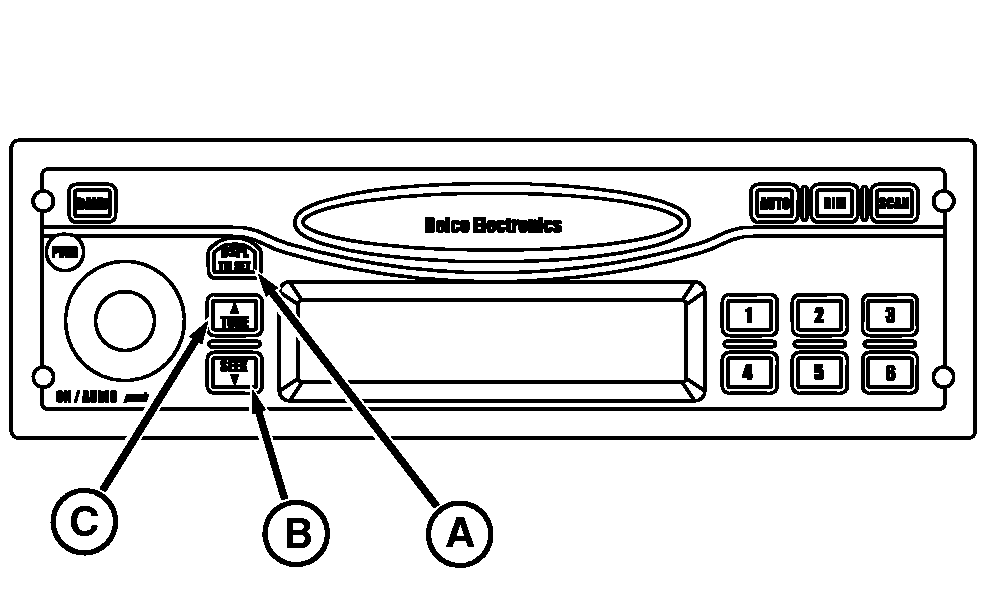
Setting the Clock-Early Model Tractors
1.
Switch ignition to ON position.
2.
Press and hold DSPL/TM SET (A) button until the "hours" digits flash.
3.
Press SEEK (B) or TUNE (C) to set the correct hour.
4.
Press and hold DSPL/TM SET until the "minutes" digits flash.
5.
Press SEEK or TUNE to set correct minute. The seconds are reset to zero when minute setting is changed.
Change display clock function to 12 or 24 hour mode.
The 12 hour mode distinguishes between AM and PM and 24 hour mode operates as military time.
1.
To change mode press and hold the "DSPL/TM SET" button until clock display digits begin to flash (approximately 2 seconds).
2.
To change from 12 to 24 hour time format, press and release the number "5" preset station button. If pressed a second time, it will toggle back from 24 to 12 hour mode.
3.
Wait 5 seconds without pushing any radio buttons for clock to return to regular operation.
|