Operating Implement Management System (IMS)
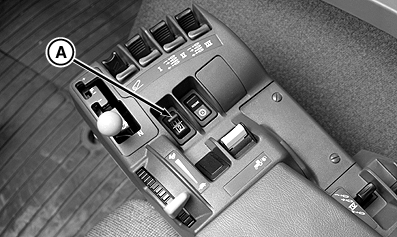
Accidental use of IMS could cause unexpected tractor or implement movement. NOTE: Press IMS ON/OFF switch to OFF, then ON to view the functions programmed in the two sequences. NOTE: Normally, IMS learned functions are executed according to distance traveled but this can be bypassed by depressing the clutch pedal during learn mode to allow all functions to be executed simultaneously (See "Programing IMS to BYPASS distance traveled function" later in this block) . 1. Programing IMS to use distance traveled to determine when functions will execute: Make sure tractor is moving with speed of at least 0.5 km/h (0.31 mph). Press ON/OFF switch (A). 2. Press LEARN/SAVE switch (B) to start programming or learning mode. |
|
 CAUTION:
Avoid possible injury and loss of tractor control.
CAUTION:
Avoid possible injury and loss of tractor control.

RW29387,0000271 -19-06MAY08-1/4 |
|
3.
Press
SEQUENCE
switch (A)
forward for 1
or
rearward for 2
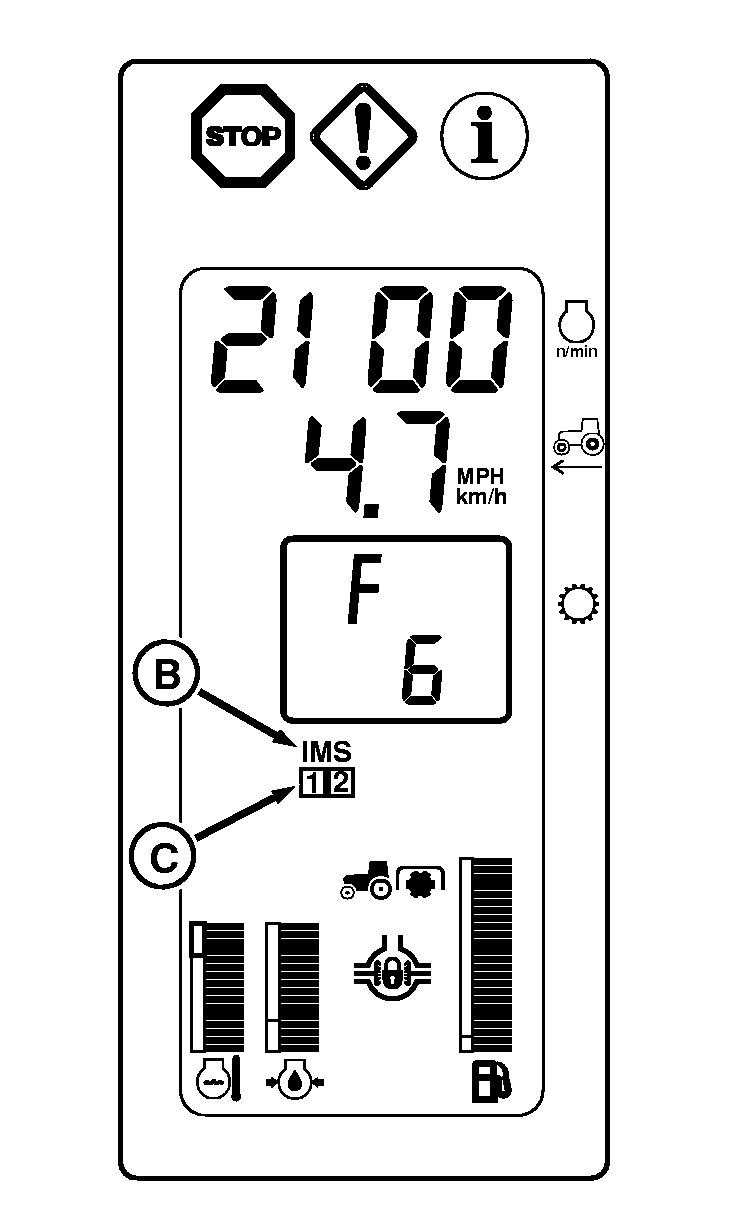
to learn Sequence. Indicator light (B) will show the sequence being learned and an audible signal will sound.
Learn Mode has a 60 second time limit and will stop recording events when time limit is reached. Should time-out occur, limit or reduce the number of steps recorded for a sequence so they are completed within the time limit or use both sequences 1 and 2 to record a complete series of events that exceeds the time limit of a single sequence (60 seconds). 4. Perform desired functions, such as "SCV1 to Extend Detent" and "Differential Lock". 5. Press LEARN/SAVE switch to store functions and end learning mode. Sequence number indicator will stop flashing. IMS indicator light (B) will remain on. NOTE: All of the functions above would execute according to the distance traveled while programming. If the tractor traveled 200 feet between "SCV1 Extend" and "Differential Lock" then they would execute at that same distance when Sequence 1 is executed regardless of speed. NOTE:
The CommandCenter will display when saving sequence or erasing sequence.
6. Press desired sequence switch and the sequence of learned events will begin. When sequence concludes, sequence number (C) will no longer display. |
|
RW29387,0000271 -19-06MAY08-2/4 |
|
Programing IMS to BYPASS distance traveled function:
NOTE: Press IMS ON/OFF switch to OFF, then ON to view in CommandCenter the functions programmed in the two sequences. 1. Make sure tractor is moving with speed of at least 0.5 km/h (0.31 mph). Press ON/OFF switch (A) to turn IMS on. 2. Press LEARN/SAVE switch (B) to start programming or learning mode. |
|
RW29387,0000271 -19-06MAY08-3/4 |
|
3.
Press
SEQUENCE
switch (A)
forward for 1
or
rearward for 2
to learn Sequence. Indicator light (B) will show the sequence being learned and an audible signal will sound.
Depress clutch pedal and hold while learning Sequence 1 (or 2). Learn Mode has a 60 second time limit and will stop recording events when time limit is reached. Should time-out occur, limit or reduce the number of steps recorded for a sequence so they are completed within the time limit or use both sequences 1 and 2 to record a complete series of events that exceeds the time limit of a single sequence (60 seconds). 4. Perform desired functions, such as "SCV1 to Extend Detent" and "Differential Lock". 5. Press LEARN/SAVE switch to store functions and end learning mode. Sequence number indicator will stop flashing. IMS indicator light (B) will remain on. NOTE:
The CommandCenter will display when saving sequence or erasing sequence.
6. Release the clutch pedal. Press desired sequence switch and learned events will be performed simultaneously. So, when Sequence 1 is executed "SCV1 to Extend Detent" and "Differential Lock" would happen at the same time. When sequence concludes, sequence number (C) will no longer display.
|
|
RW29387,0000271 -19-06MAY08-4/4 |