Lower Set Point
|
|
|
|
|
|
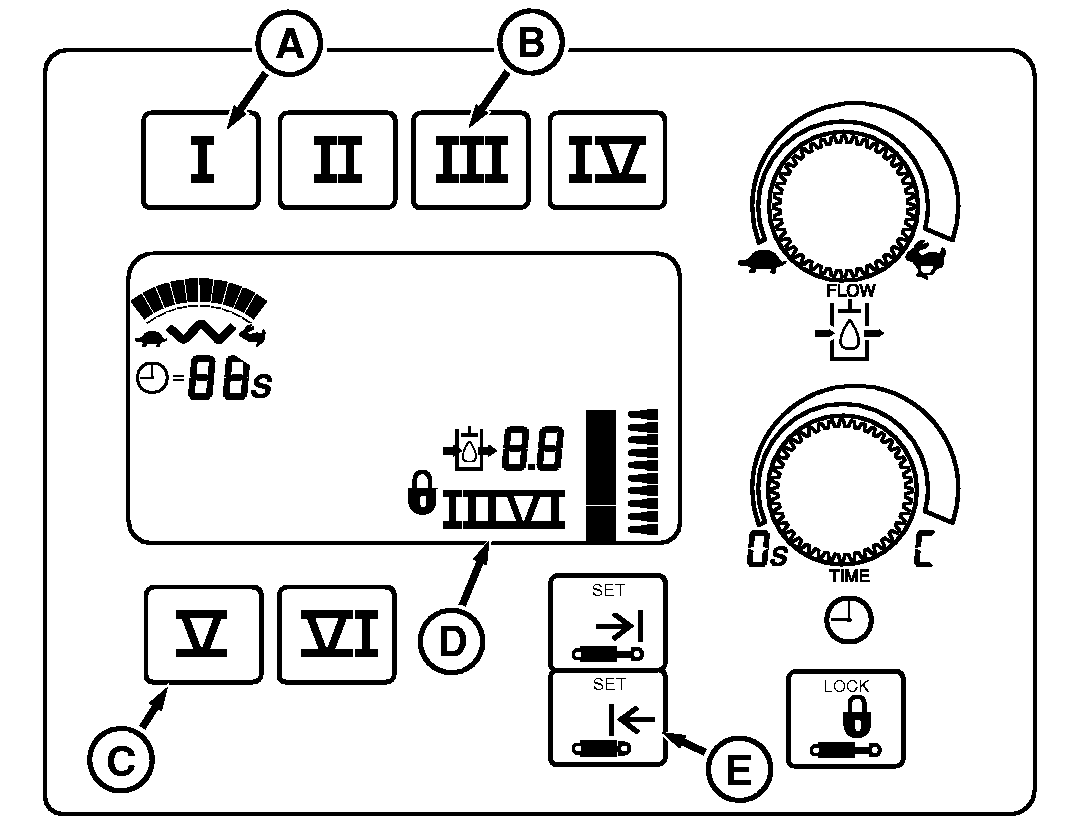
To set the lower set point, position the scraper at the lowest desired position (example: dump height). Then select the SCV for which you are storing the set point (buttons are shown to the right). Only SCVs I (A), III (B) and V (C) have set points.
After selecting the SCV, the corresponding valve number (D) will be displayed. If this valve number is incorrect, re-select the valve.
After selecting the SCV, press the retract "SET" button (E).
This will store the lower set point. As a result, the position display graph may change slightly. |
Once complete, the new lower set point is ready to use.
To change the lower set point once set, simply repeat the above procedure. IMPORTANT: When using tandem or triple scrapers, make sure the rear scraper blade, when at the lower set point, does not contact the ground when the front scraper is raised to the upper set point. Raising of the front scraper lowers the rear scraper frame which could lead to early entry of the cut if the set points are set incorrectly. |
OU1092A,00001DD -19-17SEP08-1/1 |