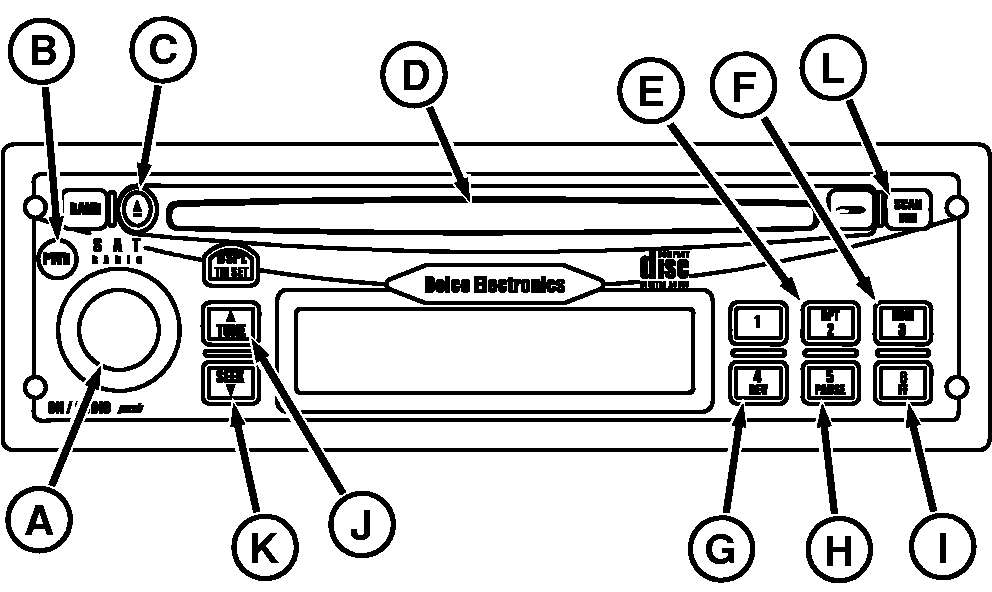
Operating the Radio with Optional Compact Disc Player-Early Model Tractors
Operating compact disc player
1.
Turn on receiver by depressing button ON (A) button or Power (B).
2.
Insert disc into compact disc slot (D) label side up.
3.
Press (N) to forward to next track. Press (O) to reverse to the beginning of the track.
4.
Press CD REPEAT (E) to repeat the current track. Press RDM (F) for random track selection.
5.
Press and hold (G) to fast reverse. Release to play at normal speed.
6.
Press PAUSE (H) to pause the CD. Press PAUSE again to resume play.
7.
Press and hold FF (I) to fast forward. Release button to play at normal speed.
8.
Press (C) to eject CD
9.
Press SCAN/DIM (L) to advance to next track on CD. The CD will play 10 seconds of that track and then play each successive track for 10 seconds. Press SCAN/DIM again to cancel.
|
AM/FM/WX Radio with Compact Disc Player
A-On/Audio/Volume
B-Power
C-Tape1/CD2 Eject
D-Tape1/CD2 Slot
E-CD Repeat
F-RDM-CD Random
G-Rev/Fast Reverse
H-Pause
I-FF-Fast Forward
J-Tune-Forward
K-Seek-Reverse
L-Scan/Dim
|