Unplugging Precutter Pickup
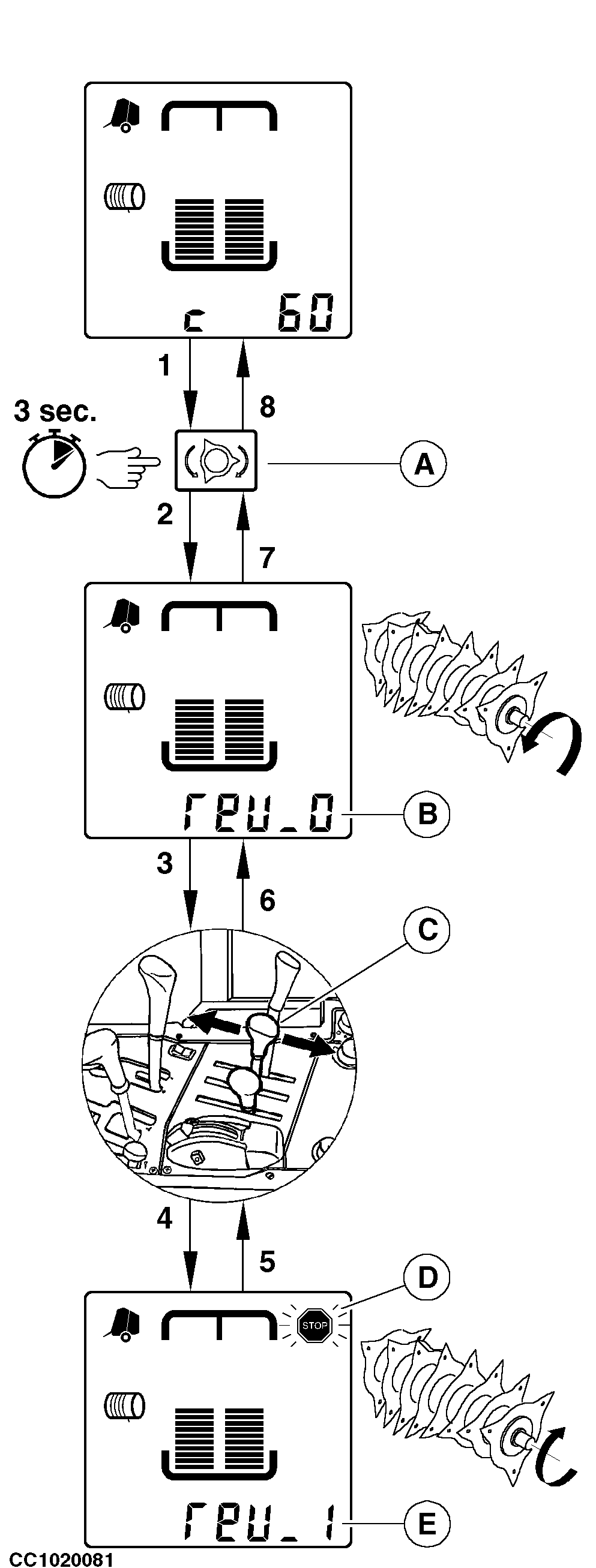
NOTE: Reversing precutter rotor function uses the same selective control valve as raising/lowering the pickup Whenever necessary to unplug the baler, reverse the precutter rotor drive. 1. Stop tractor.2. Disengage the PTO. Press and hold "PRECUTTER REVERSE" key (A) about 3 seconds. 3. The monitor enters in "Reversing Precutter Rotor" function and a slow intermittent sound alarm is emitted while this function is selected. "REV 0" (B) is displayed to indicate that precutter rotor drive is not reversed. 4. Act on selective control valve lever (C) to reverse the baler gear box. 5. When the baler gear box is reversed, the stop indicator (D) flashes, "REV 1" (E) is displayed and a quick intermittent sound alarm is emitted. Slowly engage the PTO at slow tractor idle in such a way that the rotor will receive only one impulsive rotation movement. Impulsive movement means, NOT MORE THAN A HALF TURN OF PRECUTTER ROTOR PER IMPULSE. Failure to do so could result in material wraps and rotor plugging. 6. When the baler is unplugged, disengage the PTO and act on selective control valve lever (C) to move the baler gear box in the normal operation. 7. "REV 0" (B) is displayed to indicate that the gear box is in normal operation. Put the selective control valve lever to neutral position.
|
|
OUCC006,000068F -19-07MAY02-1/2 |
|
8.
Press "PRECUTTER REVERSE" key (A) or another key to leave the "Reversing Precutter Rotor" function.
9. The monitor is back to normal operating mode. IMPORTANT: The PTO must be disengaged to change the direction of the rotor. The baler gear box must be in the normal operation to leave the "Reversing Precutter Rotor" function. |
OUCC006,000068F -19-07MAY02-2/2 |