Automatic Start of Tying Cycle
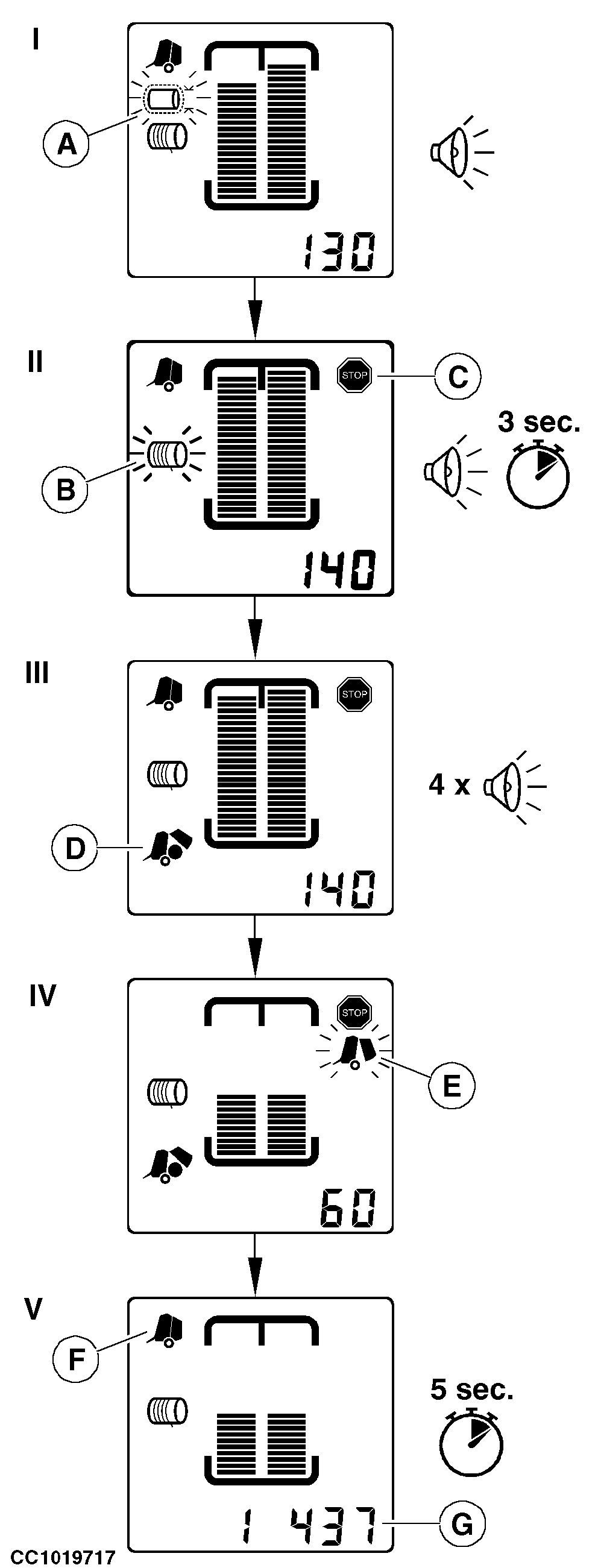
IMPORTANT: The "Channel 032: Manual Start of Tying Cycle" must be switched off to start a tying cycle automatically. See "Channel 032: Manual Start of Tying Cycle" in "BaleTrak Monitor Service" Section. I - Just before the set bale diameter is reached, the nearly full pictogram (A) flashes and the monitor beeps two times. The nearly full diameter at which the pictogram flashes is adjustable, see "Channel 010: Offset of Nearly Full Alarm" in this section. II - When the adjusted bale diameter is reached, the monitor beeps continuously for 3 seconds and the stop indicator (C) is displayed. Immediately stop the tractor. The net or twine pictogram (B) flashes (depending on which tying mode has been selected) and the tying cycle starts. For baler equipped with twine pulley sensor: If twine balls are empty, the stop indicator (C) will flash, a continuous beep will be emitted and the diagnostic trouble code "E321" will be displayed. Replace twine balls and press on "MINUS" key to clear the diagnostic trouble code. III - When the tying cycle is completed, the bale ejection pictogram (D) is displayed and the monitor beeps four times. IV - Open the gate of the baler with the tractor selective control valve lever to dump the bale. The open gate pictogram (E) flashes while the gate is opened.
|
|
OUCC006,00009BF -19-23JUL03-1/2 |
|
V - When the gate is closed, the closed gate pictogram (F) is displayed and the current bale counter (G) is displayed for 5 seconds, then the monitor is ready to make another bale. |
OUCC006,00009BF -19-23JUL03-2/2 |