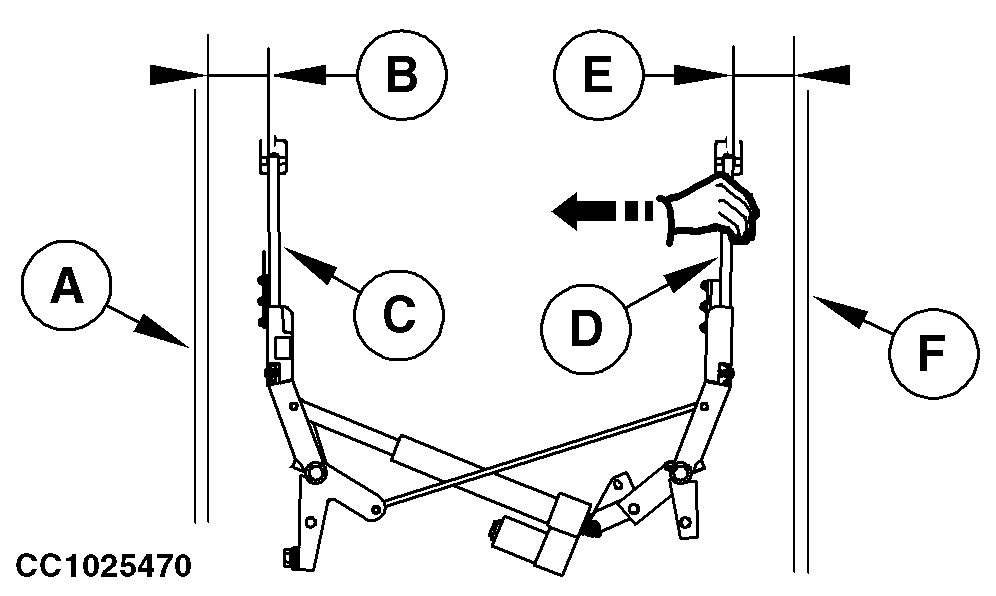
Adjusting Tying Starting Point (Double Arm Twine Tying)After having replaced or serviced the twine arm or the twine arm actuator, the twine arm starting point must be adjusted. There must be a distance of 100 ± 5 mm (4 ± 0.2 in.) between left and right-hand panels of bale chamber and twine arms when twine arm actuator is fully extended. Specification
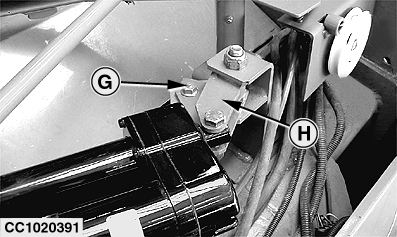
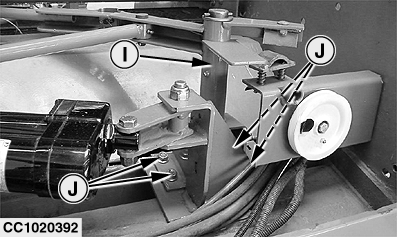
IMPORTANT: Check or adjust distance (E), by pulling right arm inside, to eliminate backlash in the linkages. Adjust as follows: 1. Fully extend twine arm actuator by pressing "EXTEND" key.2. Loosen cap screw (G). 3. Move actuator support (H) in slot to obtain specified distance (B) between right-hand side panel (A) and right twine arm (C) and to obtain positive action of twine arm on twine cutter linkage. 4. Retighten cap screw (G). 5. Loosen cap screws (J). 6. Move left twine arm axle (I) to obtain specified distance (E) between left-hand side panel (F) and left twine arm (D). 7. Retighten cap screws (J). 8. Move twine arm to home position and check that twine arm has a positive action on twine cutter linkage. 9. Calibrate twine arm actuator. (See Channel 029: Calibration of Twine Actuator in BaleTrak Monitor Service section.) |
|
OUCC006,0000BC4 -19-17AUG04-1/1 |