Retracting/Engaging Precutter Knives
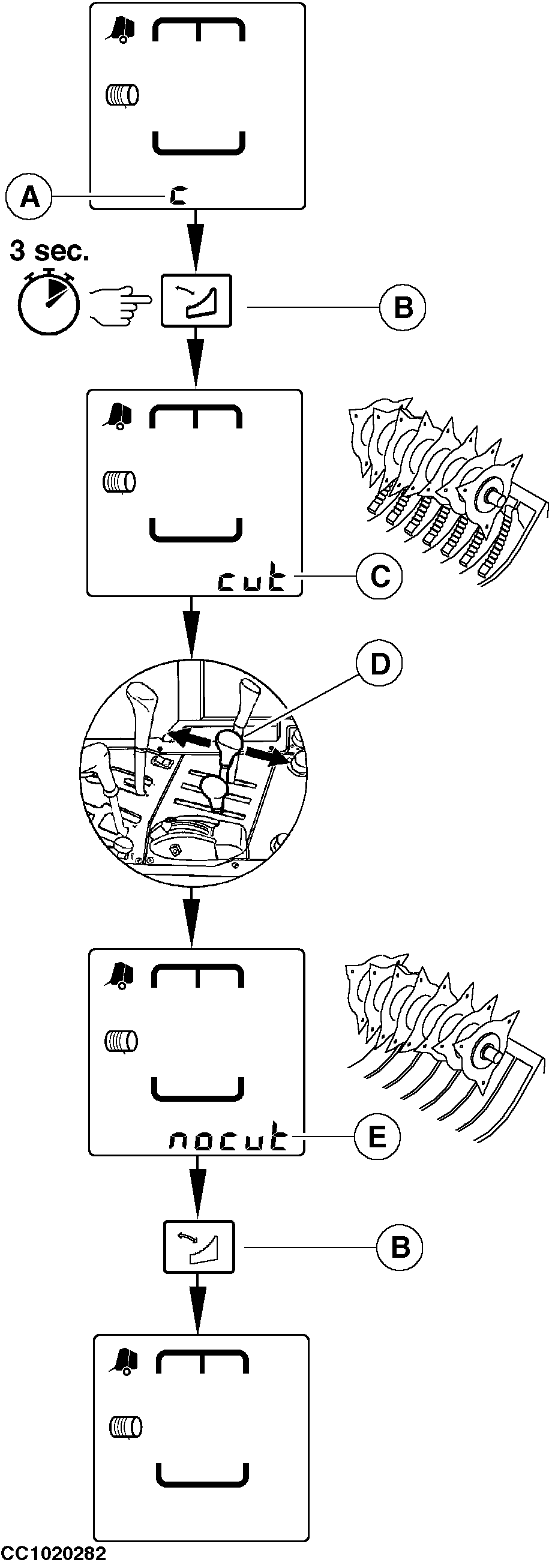
NOTE: "Retracting/engaging knives" function uses the same selective control valve as the pickup raise/lower control. The precutter device allows to chop the crop. In normal operating mode, the symbol "C" (A) is displayed if the knives are engaged and not displayed if the knives are retracted. Press and hold "PRECUTTER KNIFE" key (B) for about 3 seconds to select "knives retracting/engaging" function. The buzzer beeps to confirm that the "knives retracting/engaging" function is selected. "cut" (C) is displayed if the knives are engaged or "nocut" if the knives are retracted. Act on selective control valve lever of the tractor (D) to retract or engage the knives. "nocut" (E) (knives retracted) or "cut" (knives engaged) is displayed according to knife position. Press "PRECUTTER KNIFE" key (B) or another key to leave the "knives retracting/engaging" function. The buzzer beeps to confirm that the monitor is back to normal operating mode.
|
|
OUCC006,00011EB -19-02FEB07-1/2 |
|
IMPORTANT: During baler operation with precutter knives engaged, if some knives are disengaged during more than 2 seconds, the symbol "C" flashes and the monitor beeps. Retract and engage precutter knives several time after each working day to prevent knives jamming. NOTE: When using baler with knives retracted for a long period of time, it is recommended to remove them all (see "Replacing Precutter Knives" in "Service" section) or to install fillers to plug the knife slot (See "Knife Slot Filler Kit" in "Attachment" section). |
OUCC006,00011EB -19-02FEB07-2/2 |