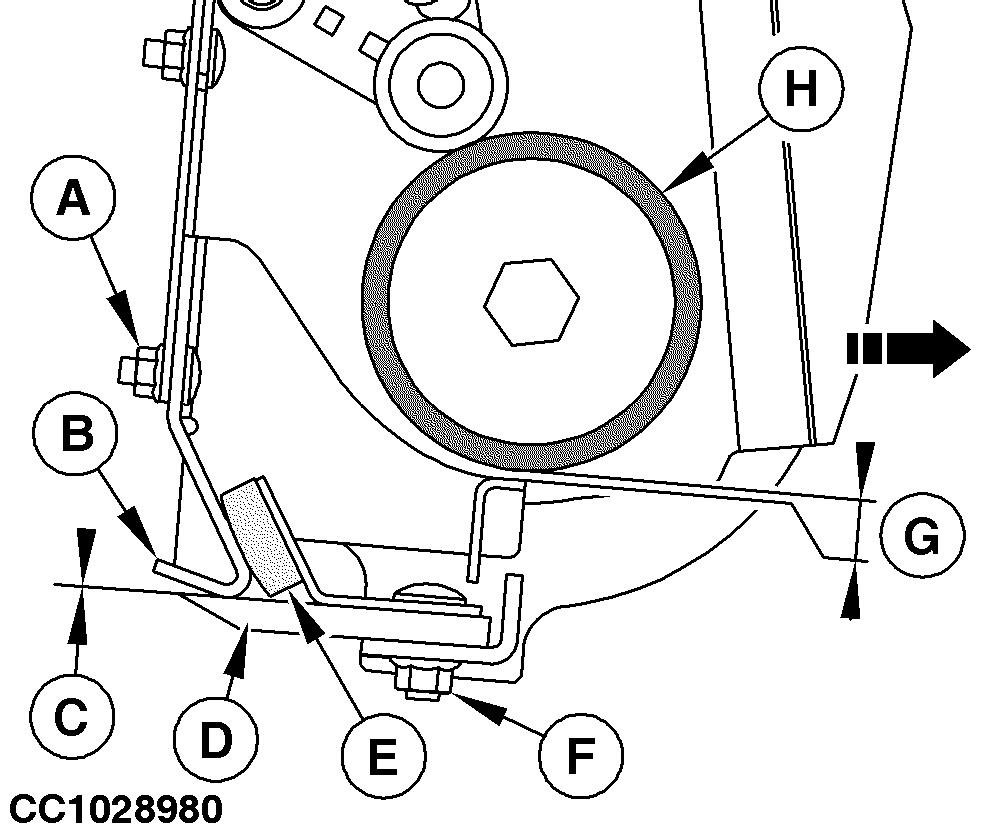
Adjusting Counter-Knife Position (Baler with CoverEdge Net Tying Device)IMPORTANT: A bad adjustment may result in net cut problems. 1. Retract net actuator.2. Check contact (C) between counter-knife (B) and knife (D):
a. Loosen nut (F) on both sides, to move rubber pad (E) forward. b. Slightly tighten nut (F) to maintain rubber pad (E) in forward position. c. Extend and retract net actuator and check contact (C) between knife (D) and counter-knife (B).
a. Loosen nut (A) on both sides. b. Position counter-knife (B) in contact with knife (D), as shown. If needed, adjust net actuator position. See "Adjusting Net Actuator Position" in this section and repeat procedure. c. Tighten nut (A) on both sides. d. Extend and retract net actuator and check contact (C) between knife (D) and counter-knife (B). 3. Check that gap (G) is within specification: Specification
If needed, adjust gap (G) by modifying counter-knife (B) position. Go to step 2. |
|
OUCC006,0001223 -19-01FEB07-1/2 |
|
4.
Check that rubber pad (E) is against counter-knife (B):
If needed, adjust rubber pad (E) as follow: a. Retract net actuator. b. Loosen nut (F). c. Position rubber pad (E) in contact with counter-knife (B). d. Tighten nut (F). IMPORTANT: After adjusting counter-knife position, always adjust rubber roll brake. See "Adjusting Rubber Roll Brake" in this section. |
OUCC006,0001223 -19-01FEB07-2/2 |