Adjust Tucker Fingers
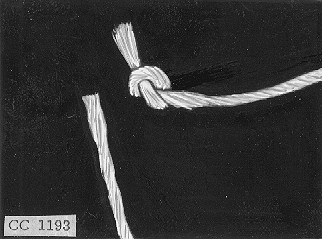
CC1193-UN-23SEP98
NOTE: Incorrect tucker finger adjustment is a major cause of tying difficulties.
To observe knotter operation, remove hay from the bale case, trip measuring arm and turn flywheel by hand until one tying cycle is completed.
With incorrect tucker finger adjustment, the knot will appear as illustrated (tucker fingers not picking up needle twine or moving it into correct tying position).
-
Adjust Tucker Fingers with Needles
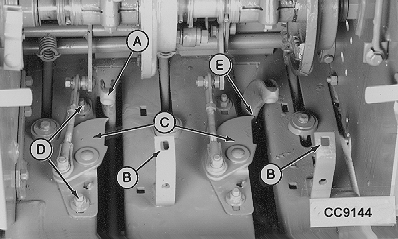
CC9144-UN-23SEP98A - Needle
B - Knotter Bracket
C - Tucker Fingers
D - Mounting Nuts
E - 1.5—3 mm (0.06—0.12 in.)
With needles (A) properly adjusted, proceed as follows:
Remove two carriage screws from knotter bracket (B) and lift knotter assemblies up and out of the needle path.
Trip bale measuring arm and turn flywheel (by hand) until tucker fingers (C) are closest to the needles as shown.
IMPORTANT: End of each tucker finger must be held upward and to the left by hand while setting clearance.
Loosen tucker finger mounting nuts (D). Move tucker fingers back or forth in the mounting slots until fingers clear needles by 1.5—3 mm (0.06—0.12 in.) (E).
Finally tighten tucker finger mounting nuts to 50 N·m (35 lb.-ft.).
-
Adjust Tucker Fingers with Bale Case
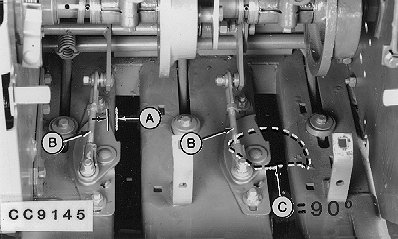
CC9145-UN-23SEP98A - 2—5 mm (0.08—0.2 in.)
B - Pull Rods
C - 90° Angle
Continue turning flywheel until the tucker fingers have returned to their ”home” position.
Tucker finger tips must be set within distance (A) to the left of the needle slot while tip is held to the left.
When tucker finger brings twine to the knotter, it must be perpendicular to the needle slot at the end of its stroke (C).
Adjust pull rods (B) to obtain correct finger position.
Secure the knotter bracket using the two carriage screws removed at the beginning of procedure.
|
OUCC002,0002312-19-20100317 |