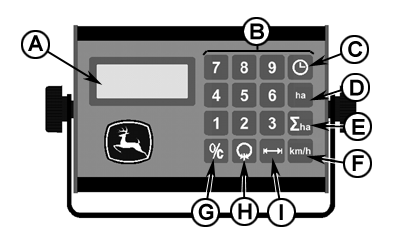
Area Counter - Function Keys (CWS)Time in Hours and Minutes When pressing the function key (C), time spent in hours and minutes (max. 99 hours and 59 minutes) will be displayed. The time counter can be stopped and started by repeatedly pressing the key. Flashing colon " : " indicates that the time counter is ON. Constant colon " : " indicates that the time counter is OFF. The time counter can be zeroed by pressing key (G) for at least 3 sec. (only when the time counter is stopped). Preparation of the time counter: Press key (C) and the last measured time consumption will be displayed. If the colon " : " flashes (time counter on), press key (C) again and the time counter is turned off (constant colon). Zeroing of time: Press key (G) for at least 3 sec. and the time counter is zeroed. Start timing: Press key (C) and the time counter turns on (colon flashes). Area counter now counts hours and minutes, and can be stopped and started again at any time as required. Trip Counter When pressing the function key (D), area in ha is displayed. From 0 to 99.99 ha (acres) area is shown with 2 decimals, and after this with 1 decimal from 100 to 999.9 ha (acres). Preparation of the trip counter: Press key (D) and the last measured area is displayed. |
|
MB03730,0000214 -19-20NOV02-1/2 |
|
Press key (G) for at least 3 sec. Area trip counter is zeroed. Total Counter When pressing the function key (E), total area in ha (acres) is displayed (max. 9999). This function is used for totalling area worked for instance during 1 month or 1 year. Preparation of total counter: Press key (E) and the last measured area is displayed. Press key (G) for at least 3 sec. Area total counter is zeroed. The two area meters are now ready for use, and even though another function is displayed during work, the area meters continue counting. Therefore the speed-function is normally chosen during work, and here an " r ", appears on the display, whenever the area meters are stopped. The area meters automatically stop/start when the implement is lifted/lowered (feeder house sensor). NOTE: For harvesting corn is necessary to readjust the sensor position to enable the area meter in a higher position in relation to ground. By the end of each day you are able to see the day's result. At the beginning of next day the first mentioned area meter is cleared, while the other one automatically sums up the area worked during the week. |
MB03730,0000214 -19-20NOV02-2/2 |