Meter Hub Adjustment
If the gap between the disk and housing is too large or if the disk rotates only with difficulty, then adjust the meter hub as follows:
-
Open vacuum meter.
-
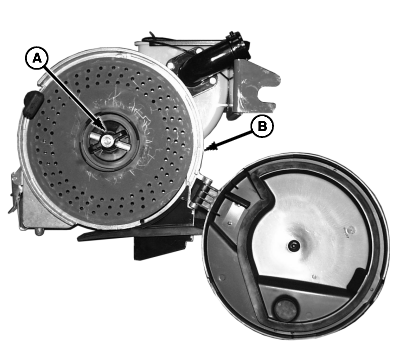
A50298-UN-11OCT02A - Hub Rod
B - Seed Disk
Rotate hub rod (A) counterclockwise. Remove seed disk (B) from housing. -
A49914-UN-19AUG02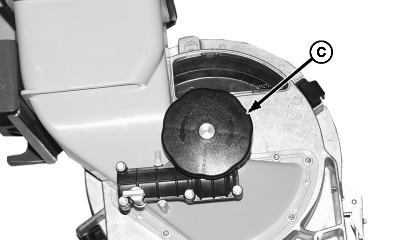
A49915-UN-03DEC02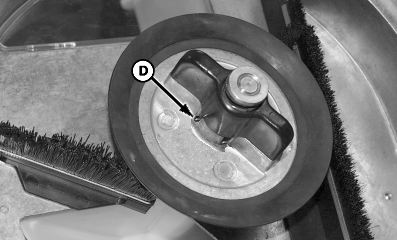
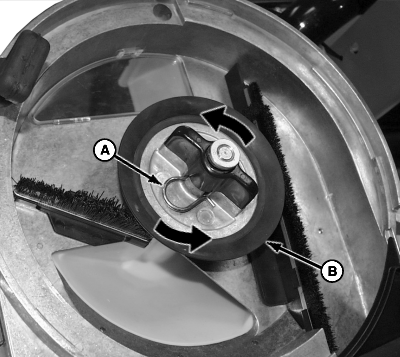
A49916-UN-19AUG02A - Spring Locking Pin
B - Hub
C - Meter Hub Rod
D - Slot
Remove spring locking pin (A). -
Adjust hub (B) as follows:
-
Secure meter hub rod (C).
-
Turn hub (B) clockwise to move seed disk closer to meter housing or counterclockwise to move seed disk farther from housing.
-
-
Turn hub until slot (D) aligns with hole in shaft and install spring locking pin (A).
-
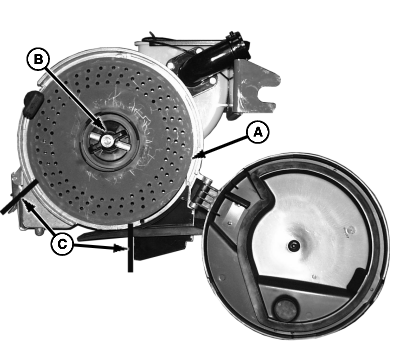
A50297-UN-11OCT02A - Seed Disk
B - Hub Rod
C - Section
Install seed disk (A) into housing. Hold disk securely and rotate hub rod (B). -
NOTE: The seed disk (A) should rotate smoothly, slightly touching the meter case. Seed should not leak around circumference of meter. When planting small seeds such as sorghum the seed disk should remain in light contact with the meter housing to prevent the escape of seeds.
Manually turn the disk and check the gap between the disk and the meter housing in the indicated section (C). If the disk encounters a lot of friction or if seeds are escaping through this space, repeat procedure.
|
AG,OUO6074,1179-19-20000804 |