Use of Double Eliminator - Type A
NOTE: When using double eliminator, set vacuum to approx. level 15.
The "sawtooth pattern" double eliminator gradually covers part of the hole and removes extra seeds (doubles) from seed disk. Double eliminator must be used with flat seed disks. There are two types of flat seed disks, those for sweet corn and those for beans. Use table below to obtain initial setting.
|
Double Eliminator Initial Setting |
|
|---|---|
|
Seed Disk Type |
Double Eliminator Initial Setting |
|
Disks for sweet corn: A52390 A52391 |
1 |
|
Disks for beans: A52878 A52904 A52903 |
2 |
-
A52494-UN-29JUL03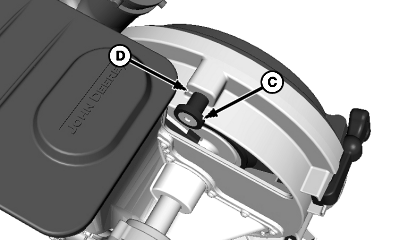
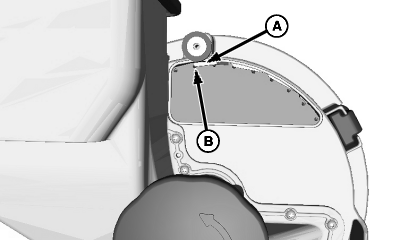
A52493-UN-29JUL03A - Double Eliminator
B - Seed Disk Hole
C - Set Button
D - Decal Reading
Check that double eliminator (A) is covering 50% of the hole on the seed disk (B). -
NOTE: Make initial adjustments to one row and adjust all others in the same manner.
To adjust double eliminator, turn eliminator adjustment knob (C) until it is covering 50% of the hole on the seed disk.
-
Take the decal reading (D) and adjust all other rows accordingly.
-
When using a seed monitor, plant at a distance that is long enough to permit the average seed population per row to be calculated.
-
If row has a high seed population, adjust double eliminator so that it covers a greater part of the hole on the seed disk. If row has a low population, adjust double eliminator so that it covers a lesser part of the hole on the seed disk.
-
Repeat the process until the population is relatively equal in all rows.
|
GB52027,0000431-19-20090317 |