Finger Pick-Up Mechanism
-
NOTE: Repeat every 100 hours, or once a season, whichever occurs first.
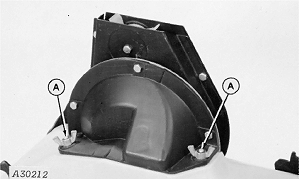
A30212-UN-13OCT88A - Side Nut
Remove seed feeder from machine. -
With seed feeder upside down remove the side nuts (A) that attach the finger pick-up mechanism to the underside of the seed feeder and pull the mechanism directly upwards to free it from the two mounting pins and the attaching ring.
-
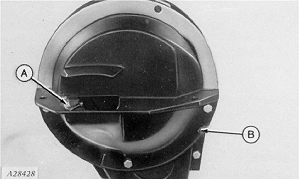
A28428-UN-13OCT88A - Assembly
B - Deflector
Remove the three bolts and deflector (B) from the front part of the finger pick-up assembly (A) to access fingers. -
IMPORTANT: Never turn finger pick-up mechanism backward. This may damage brush.
IMPORTANT: Periodically check tightness of adjustment nuts. Failure to appropriately adjust the finger pick-up assembly will cause the loosening of the assembly and probable overpopulation, especially with small corn seeds.
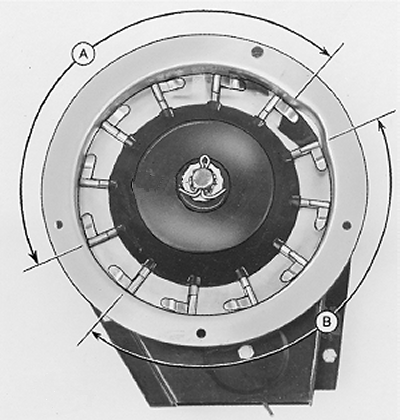
A46468-UN-03AUG00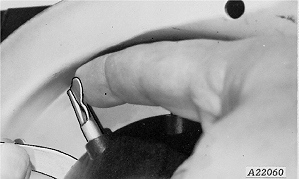
A22060-UN-13OCT88A - Area
B - Area
Turn finger pick-up by hand making sure springs are holding tabs of fingers in contact with carrier plate in appropriate area (A) and cam is raising fingers properly in remaining area (B).Play between the fixed and carrier plate should be less than 0.15 mm (0.006 in.) with slight tension on the tabs of pick-up fingers adjacent to the area being measured. Raise the tab of the pick-up finger until contact is made then use calipers to check play between fixed plate and carrier plate.
-
If there is excessive accumulation of chemical matter or dry straw under the fixed plate, or the play between the two plates is too great, or the fingers have to be replaced, then dismount and clean or repair mechanism in the following manner:
-
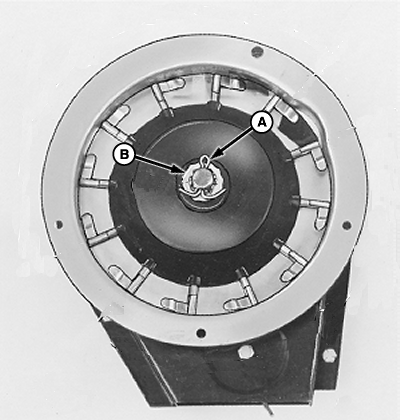
A46469-UN-03AUG00A - Cotter Pin
B - Locking Nut
Remove cotter pin (A), locking nut (B) and axle adjustment nut. -
Carefully remove finger pick-up assembly from axle and clean it.
-
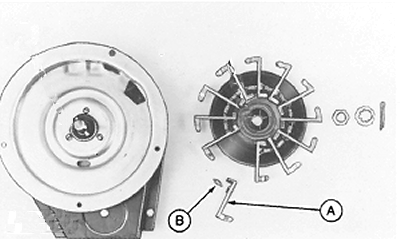
A46470-UN-03AUG00A - Pick-Up Finger
B - Spring
To replace fingers (A) or springs (B), remove springs from finger and remove finger from support. When replacing fingers, install springs with open end of spring loop toward inside of finger holder. -
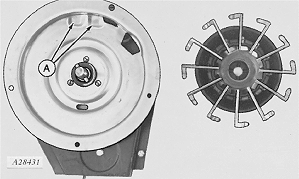
A28431-UN-13OCT88A - Dimples
Before mounting finger pick-up assembly on support, check dimples (A) on carrier plate for wear.The carrier plate is made of steel plates hardened with a layer of tough chrome deposited on the surface. Excessive wear of dimples will result in overpopulation, especially with small corn seeds.
Inspect carrier plates annually. Replace carrier plates when hard chrome surface has worn away and hardened steel case begins to wear too. This can be detected by a change in shape of dimples (A).
-
IMPORTANT: Never turn finger pick-up mechanism backward. This may damage brush.
NOTE: The finger must be rest on the fixed plate in such a way that it is leveled in relation to the carrier plate when installed. Align notch of bearing (E) with the protuberance of cam (D).
NOTE: Adjusting the tension of the nut for various seed sizes and shapes will affect meter performance. See your John Deere dealer about adjusting the nut tension on a seed metering test device for the specific size and shape of seeds. The dealer is the best source of information regarding the service and adjustment of the seed meter.
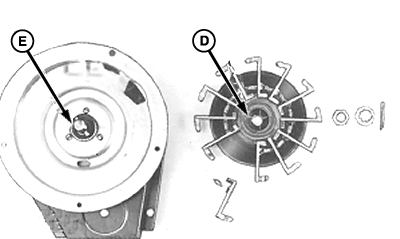
A46471-UN-03AUG00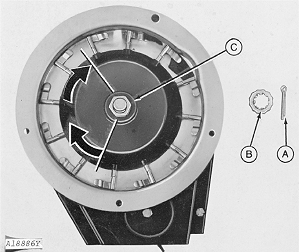
A18886-UN-13OCT88A - Cotter Pin
B - Locking Nut
C - Nut
D - Cam Protuberance
E - Bearing Notch
Install finger pick-up assembly and adjustment nut (C) on axle. -
With the fixed plate firmly set against the carrier plate, turn the nut by hand clockwise until it comes into contact with the fixed plate and slight resistance occurs.
-
Continue to rotate nut a little more clockwise (one third of a turn) until the fixed plate is firmly fixed against the carrier plate.
-
Turn fixed plate by hand to check that mechanism is not too tight. The fixed plate must be adjusted firmly against carrier but still turn by hand with moderate force.
-
Fix adjustment in place with locking nut (B) and cotter pin (A).
-
IMPORTANT: Periodically check tightness of adjustment nuts. Failure to appropriately adjust the finger pick-up assembly will cause the loosening of the assembly and probable overpopulation, especially with small corn seeds.
The above-stated adjustment can be checked by verifying if the play between the fixed and carrier plate is less than 0.15 mm (0.006 in.) with slight tension on the tabs of pick-up fingers adjacent to the area being measured. Raise the tab of the pick-up finger until contact is made then use calipers to check play between fixed plate and carrier plate.
A22060-UN-13OCT88 -
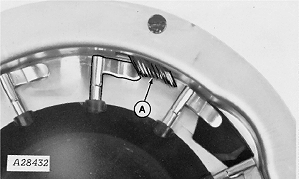
A28432-UN-07JUN89A - Brush
The meter brush (A) helps to dislodge seeds trapped under individual fingers. If the brush is too worn, the fingers may deliver more than one seed, leading to overpopulation.Brush length must cover at least half of the finger pick-up tabs. As the brush is constantly used during operation its replacement every 100 hours of operation is recommended.
-
IMPORTANT: When installing the belt, check that it is centered in the meter. The tilt of the lower cylinder can be adjusted by loosening the belt coverage hardware and moving it up and down, placing a flat headed screwdriver in the space between the cover and the belt drive.
The seed transport belt and drive must be replaced if worn. If the belt is worn (the holes have become elongated) or rigid, the placement of seeds in the tube will be affected. The belt drive wheel should be replaced when the edges of the tabs start to become pointed. Sharp edged tabs on the drive wheel can “catch ” on the belt causing vibration in the meter belt area and alter seed spacing.
-
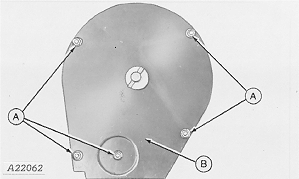
A22062-UN-13OCT88A - Locking Bolt
B - Cover
Remove bolts (A) and belt housing cover (B) -
IMPORTANT:
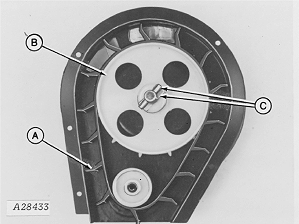
A28433-UN-07JUN89A - Vanes
B - Drive Wheel
C - Spring Pins
If the belt is replaced, the vanes (A) must be positioned as illustrated in diagram.To remove belt drive wheel (B), remove spring pins (C).
-
|
ML70882,000052E-19-20041203 |