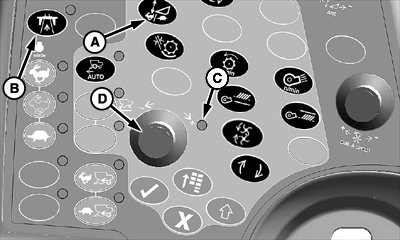
Feeder House Rate/Sensitivity Adjust Switch (Black)
H86963-UN-20NOV06
A - Feeder House Rate/Sensitivity Adjust Switch
B - Road Transport Disconnect Switch
C - Indicator Light
D - Selection Dial
Feeder house rate/sensitivity adjust switch (A) allows operator to compensates for uneven ground and controls horizontal and vertical positions of header. The system continuously compares the preset position and actual position, thus keeping header in desired working position.-
Verify road transport disconnect switch (B) is in field position.
-
NOTE: Pressing confirm switch makes feeder house rate/sensitivity icons appear on display.
Select desired feeder house adjust setting:
-
Press switch once time to select manual raise/lower speed.
-
Press switch two times to select header height sensitivity adjust.
-
NOTE: Feeder house tilt sensitivity function only works on lateral tilt equipped machines.
Press switch three times to select feeder house tilt sensitivity adjust.
-
-
Indicator light (C) comes on indicating that desired choice can be adjusted.
-
Turn selection dial (D) towards plus (+) symbol to increase response rate/sensitivity or towards minus (-) symbol to decrease response rate/sensitivity.
-
CommandCenter display shows operator adjustment setting.
NOTE: For more detailed information, refer to Description of Automatic Header Height Control System, in CommandTouch Cab Cornerpost section.
|
OUO6075,00000C6-19-20080424 |