CommandCenter Display Warning Indicators
H86093-UN-10JAN07
H86091-UN-24AUG06
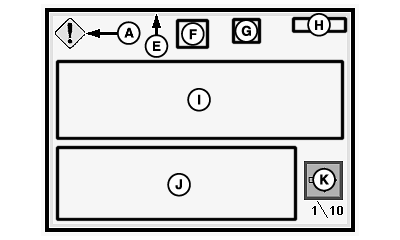
A - Severity Icon and Color
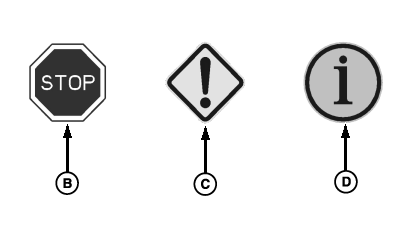
B - Red Light
C - Yellow Light
D - Gray Light
E - Border Color (Severity Of Alarm)
F - Problem Indicator Symbol (Optional)
G - Controller Identifier
H - System Parameter Number (SPN) and Failure Mode Indicator (FMI)
I - Warning Description
J - Recommended Solution Description
K - Action Button
CommandCenter displays the following:Severity Icon and Color (A): Severity level of warning issued will be identifiable by icon (stop engine, service alert, information) and color (red, yellow, grey).
- Red Light (B): Stop engine at once and correct problem.
- Yellow Light (C): Service or correct problem. Stop engine as required.
- Gray Light (D): Be aware of condition.
Border Color (E): Severity level will also be indicated by a border (red, yellow, gray).
Problem Indicator Symbol (Optional) (F): Problem icon will be displayed relating to the system producing the warning.
Controller Identifier (G): A three letter acronym that identifies the controller issuing the warning.
System Parameter Number (SPN) and Failure Mode Indicator (FMI) (H): Diagnostic trouble code (DTC) will be located in upper right-hand corner.
Warning Description (I): A description identifying the type of warning (e.g. Oil Pressure Low).
Recommended Solution Description (J): Text describing what happens when associated action button(s) are pressed, and/or how to resolve the problem.
Acknowledgement Button (K): Provides acknowledgement to warning(s). An action a user can take when a warning is issued (e.g. Ignore Sensors). Multiple warning screens may appear (e.g. 1/5). This means four other warning screens will follow when acknowledged.
|
OUO6075,0000592-19-20070404 |