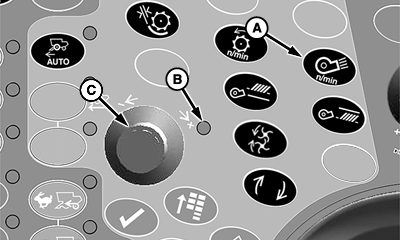
Cleaning Fan Speed Adjust Switch (Black)
H86955-UN-20NOV06
A - Cleaning Fan Speed Adjust Switch
B - Indicator Light
C - Selection Dial
Cleaning fan speed adjust switch (A) will increase cleaning fan speed or decrease cleaning fan speed as determined by operator.-
Turn separator engage switch ON.
-
Press cleaning fan speed adjust switch.
-
Indicator light (B) will come on indicating setting can be adjusted.
-
Turn selection dial (C) towards plus (+) symbol to increase cleaning fan speed or towards minus (-) symbol to decrease cleaning fan speed.
-
CommandCenter display will show operator adjustment setting.
Fan speed motor has a thermal (heat) shut off that stops the motor from working if any of the following happen:
- Switch is used continuously for more than two or three minutes.
- Adjustment system is against stop while motor is still trying to change speed.
- Excessive binding or dragging in linkage.
If any of the above causes are suspected, clean and adjust as necessary.
NOTE: Allow motor to cool 10 to 15 minutes before trying switch again.
|
OUO6075,00005ED-19-20070330 |