Cutterbar Pressure Adjust Switch (Black)
NOTE: Switch only works on HydraFlex equipped platforms.
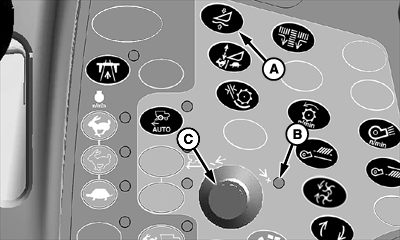
H86964-UN-20NOV06
A - Cutterbar Pressure Adjust Switch
B - Indicator Light
C - Selection Dial
Cutterbar pressure adjust switch (A) controls the amount of pressure in the cutterbar as determined by operator.-
Press cutterbar pressure adjust switch.
-
Indicator light (B) will come on indicating setting can be adjusted.
-
Turn selection dial (C) towards plus (+) symbol to increase cutterbar pressure and setpoint or towards minus (-) symbol to decrease cutterbar pressure and setpoint.
-
CommandCenter display will show operator adjustment setting.
|
OUO6075,00005F6-19-20070330 |