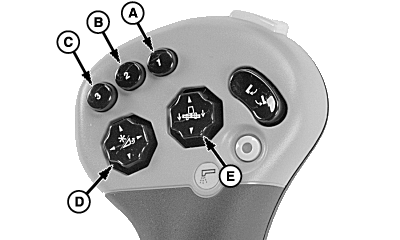
Header Activation Buttons (Black)
H85898-UN-10MAY06
A - Activation Button 1
B - Activation Button 2
C - Activation Button 3
D - Reel Lift/Reel Fore and Aft Switch
E - Header Raise/Lower and Contour-Master Manual Tilt Switch
When header activation buttons (A), (B) or (C) are pressed the following functions are performed:- Header Height Resume
- Header Height Sensing
- Contour-Master Control
- Reel Position Resume
- Active Header Float
The electronic control system will move the header back to preselected position chosen by the operator.
NOTE: Header positions obtained by pressing activation buttons may be overcome by pressing reel raise/lower or reel fore and aft switch (D) or header raise/lower and Contour-Master tilt switch (E). Once activation buttons are manually overcome, press desired activation button to reactivate.
System Requirements:
- Properly equipped header is connected.
- Engine is running.
- Road transport disconnect switch must be in field position.
- Header Height Resume, Header Height Sensing or Active Header Float mode are enabled.
- Header is engaged.
Pressing header activation buttons activates system. Header control system will take control and move header to the operator selected position.
|
OUO6075,0000607-19-20070329 |