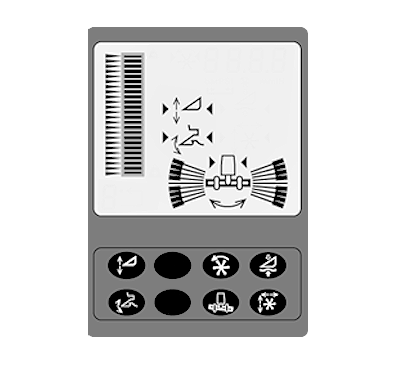
Description of Automatic Header Height Control System
H86522-UN-13DEC06
System Requirements:
- Road transport disconnect switch must be in field position.
- Engine is running.
- Header engaged.
- Desired header control mode activated.
Lateral Tilt Adjustment—Two modes
- Manual Adjust — hydraulic components are directly activated by multifunction control handle.
- Automatic Adjust — parallel adjustments of the header in relation to the ground are carried out by sensors on each end of header. This ensures that the distance between the header and the ground is equal on both the left-hand and right-hand sides.
Platform Height Adjustment—Four Modes
- Manual Adjust — hydraulic components are directly activated by multifunction control handle.
- Automatic height resume — platform can be set to any position within the feeder house range.
- Automatic height sensing — height of the platform is maintained with height sensors attached to the platform. This ensures that header height is always constant over rough terrain.
- Automatic float control — machine maintains a constant header pressure with ground contact.
NOTE: It is possible to override automatic modes manually.
H87056-UN-30JUL07
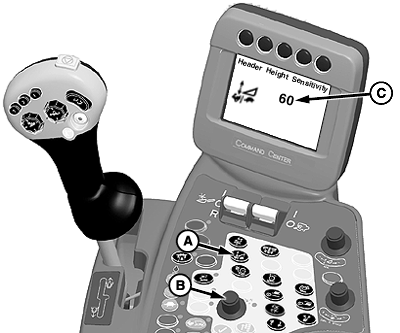
A - Feeder House Rate Adjust and Sensitivity Adjust Switch
B - Selection Dial
C - Sensitivity Settings
Height Sensing and Active Header Float Pressure Sensitivity (Automatic Functions) controls the speed of response for header movements when in automatic sensing and automatic float modes.Operation:
NOTE: Press feeder house rate adjust and sensitivity adjust switch twice to adjust sensitivity settings (C).
Sensitivity setting will be shown on CommandCenter display when adjusting. Settings are adjusted between 0 to 100.
Press feeder house rate adjust and sensitivity adjust switch (A) twice and use selection dial (B) to adjust speed at which header follows ground contour.
Turn selection dial clockwise to increase response rate or counterclockwise to decrease response rate settings.
H87057-UN-30JUL07
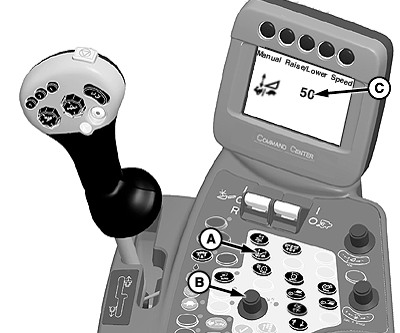
A - Feeder House Rate Adjust and Sensitivity Adjust Switch
B - Selection Dial
C - Rate Settings
Manual Raise/Lower Speed (Manual Functions) controls response rate of header raise/lower functions for manual control or when in automatic height resume mode.Operation:
NOTE: Press feeder house rate adjust and sensitivity adjust switch once to adjust rate settings (C).
Rate setting will be shown on CommandCenter display when adjusting. Settings are adjusted between 0 to 100.
Press feeder house rate adjust and sensitivity adjust switch (A) once and use selection dial (B) to adjust rate at which header will react when being raised or lowered.
Turn selection dial clockwise to increase response rate or counterclockwise to decrease response rate settings.
|
OUO6075,0000611-19-20070727 |