VisionTrak Tailings Sensor Display—Operational Check
NOTE: Wrong seed size settings will cause inaccurate tailings volume. If bar graph shows full or warning alarm screen appears on CommandCenter, stop machine and adjust chaffer and sieve.
H86527-UN-13DEC06
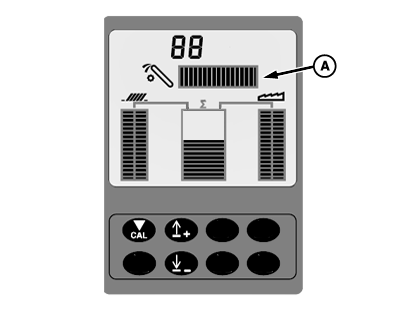
A - Horizontal Bar Graph
Check for acceptable loss levels.Check tailings sensor display for location of horizontal bar graph (A). Bar graph is a visual guide which can be referred to periodically to see if an increase or decrease in tailings volume occurs.
If bar graph begins to show an increase in volume, slow machine ground speed and see if bar graph goes back into the acceptable loss range.
If bar graph does not go back into the acceptable loss range after slowing machine ground speed, disengage header switch. Bar graph should zero itself (nothing showing in bar graph). Engage header switch, bar graph should go back into the acceptable loss range.
H70551-UN-02JAN02
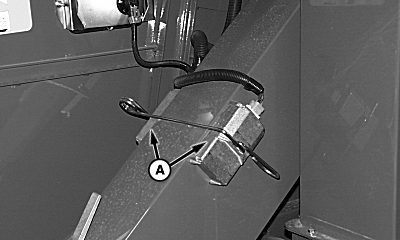
A - Tailings Sensor
If tailings sensor display consistently reads full (all bars lit) when not harvesting or empty (no bars lit) when harvesting, it may indicate that the lens is coated with material or seal under lens has allowed dust to enter:-
Remove tailings sensors (A) to inspect and clean lenses if needed.
-
If lenses are clean, remove and check for dust. If dust is found, completely clean area and reassemble lens onto unit making sure gasket is sealing.
-
Replace sensor and test system.
-
If VisionTrak display continues to read full or empty, contact your John Deere dealer.
|
OUO6075,0000616-19-20070725 |