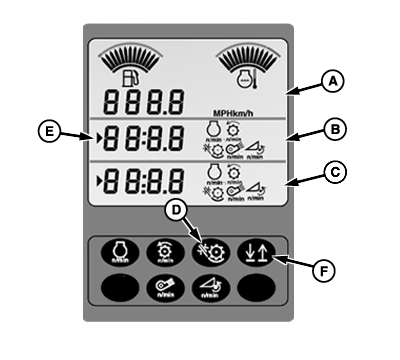
Triple Tachometer Digital Display Lines
H86005-UN-13DEC06
A - Upper Display
B - Middle Display
C - Lower Display
D - Threshing Clearance
E - Indicator Arrow
F - Up/down Arrow Button
Upper display line (A) will only display machine ground speed (km/h or mph).Middle display line (B) and lower display line (C) can display the same data. Operator selects any of the following data to be displayed on either line (middle or lower).
- Engine Speed (RPM)
- Threshing Speed (RPM)
- Fan Speed (RPM)
- Header Backshaft Speed (RPM)
- Concave Clearance
To display threshing clearance, press threshing clearance button (D). Threshing clearance along with appropriate symbol will display on middle display line.
Pressing concave, cleaning fan speed or threshing speed switches on armrest will cause that function to display on the tachometer.
Middle and lower display always show the last information displayed when key switch was turned OFF.
Either middle line or lower lines of the display can be changed by the operator to display any data of choice.
Line that is currently active to change, will be shown by an indicator arrow (E). The appropriate arrow will be displayed when the operator pushes the up/down arrow button (F) which moves the display from the currently active line to another line.
|
OUO6075,000061E-19-20070725 |