Operator Interface Controls
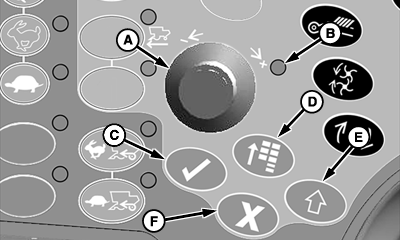
H86932-UN-20NOV06
A - Selection Dial
B - Indicator Light
C - Confirm Switch
D - Main Menu Switch
E - Display Select Switch
F - Cancel Switch
- Selection Dial (A): allows operator to move the “focus” from item to item on the CommandCenter display. As item is highlighted, a “tool tip” will appear describing what the highlighted object is. Selection dial is also used for data entry to increase/decrease numeric values.
- Indicator Light (Green) (B) : indicates that a switch was selected and now can be adjusted to the operator desired position or setting.
- Confirm Switch (Green) (C): allows operator to select desired “focus” area on CommandCenter display or to confirm an action.
-
Main Menu Switch (Green) (D): is used
to change the active “application” that the CommandCenter
display is running. Items or applications, in the menu included:
- Combine Settings
- On Board Diagnostic Troubleshooting
- Display Settings
-
NOTE: Display select switch must be activated to navigate between
CommandCenter and GreenStar display (if equipped), see your John Deere
dealer for further information.
Display Select Switch (Green) (E): allows operator to change which display the selection dial controls (CommandCenter or GreenStar display (if equipped)). - Cancel Switch (Green) (F): allows operator to cancel an action on CommandCenter display at anytime.
|
OUO6075,00009C0-19-20070713 |