Clear Distance Area Counter or Weight and Moisture Counter
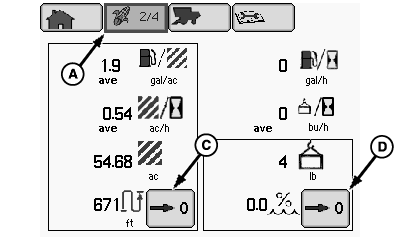
H86340-UN-15JUN07
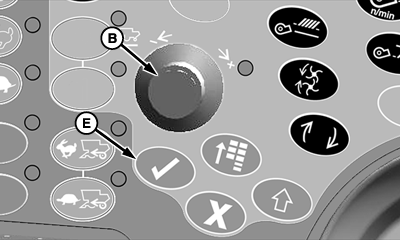
H86934-UN-20NOV06
A - Harvesting Information Icon
B - Selection Dial
C - Distance and Area Counter Reset Box
D - Weight and Moisture Counter Reset Box
E - Confirm Switch
From harvesting information icon (A), rotate selection dial (B) until distance and area counter reset box (C) or weight and moisture counter reset box (D) is highlighted.Press confirm switch (E) to reset highlighted box to zero.
-
NOTE: Clearing distance and area numbers on this page will not
clear Farm, Field, Crop Totals on next page. Only these counters will
be cleared.
Distance and Area Counter - shows total distance traveled and area since being reset. -
NOTE: Clearing weight and moisture numbers on this page will
not clear Farm, Field, Crop Totals on next page. Only these counters
will be cleared.
Weight and Moisture Counter - shows weight and moisture numbers since being reset.
|
OUO6075,00009C4-19-20070404 |